


2. Vectors#
Jul 20, 2026 | 9793 words | 65 min read
Chapter roadmap
This chapter introduces vectors as quantities with both magnitude and direction. Vectors can be represented geometrically with arrows, algebraically with components, and computationally with NumPy arrays.
As you read, focus on three questions:
Can I represent a vector using arrows, components, and Python arrays?
Can I move deliberately between geometric, component, and computational representations?
Can I explain the physical meaning of vector addition, subtraction, and components?
These ideas provide the mathematical language needed to describe motion, forces, momentum, and rotation throughout the course.
2.1. Scalars and Vectors#
This narration is AI-generated from the course text.
2.1.1. What is a scalar?#
A scalar defines the amount of something in one dimension. They are accompanied by a unit which signifies the dimension in particular. We learn about dimensions as a concept of length (e.g., meters), but a dimension can be generally described as one aspect of a thing.

Fig. 2.1 The Toyota Corolla is the best-selling car of all-time. Image Credit: Wikipedia.#
For example, your car (see Figure 2.1) has multiple dimensions:
mass –> \(1500\ {\rm kg}\)
age –> \(4\ {\rm yr}\)
gas tank –> \(10\ {\rm gal}\)
gas mileage –> \(40\ {\rm mpg}\)
Each of these dimensions for describing the car has a number followed by the unit, which makes up the scalar quantity.
2.1.2. Scalar arithmetic#
Scalar quantities can only be combined (or separated) when the have the same unit. For example, a \(50\)-\({\rm min}\) class that ends \(10\ {\rm min}\) early lasts for \(50\ {\rm min} - 10\ {\rm min} = 40\ {\rm min}\).
If you were told that the class ended \(600\ {\rm sec}\) early, you cannot combine (or separate) the quantities directly. Instead, you must first convert to a common unit, then you can proceed as before.
Note
You can write in math mode using $ $ or using the \begin{align} \end{align} environment. See the source of this notebook (rocketship on Google Colab) for more details.
class_time = 50 #class time in minutes
early_time = 600 #amount of time early (in sec)

# must convert the early time from sec -- > min
class_time_early = class_time - (early_time/60)
print("The class ends %2.0f minutes early." % class_time_early)
The class ends 40 minutes early.
Scalars can also be multiplied and divided, where units can be combined under the appropriate operation. For example, energy is described by the amount of force applied (i.e. multiplied) over a distance, or \(E = Fd\).
Suppose you pushed a 0.5-\({\rm kg}\) box with a force of 1 \(\rm Newton\) horizontally across the floor for 5 meters (see Figure 2.2). Then, you expended \(5\ {\rm N\cdot }m\) of energy. The unit is combined to form a Newton-meter, or \(\rm Joule\).
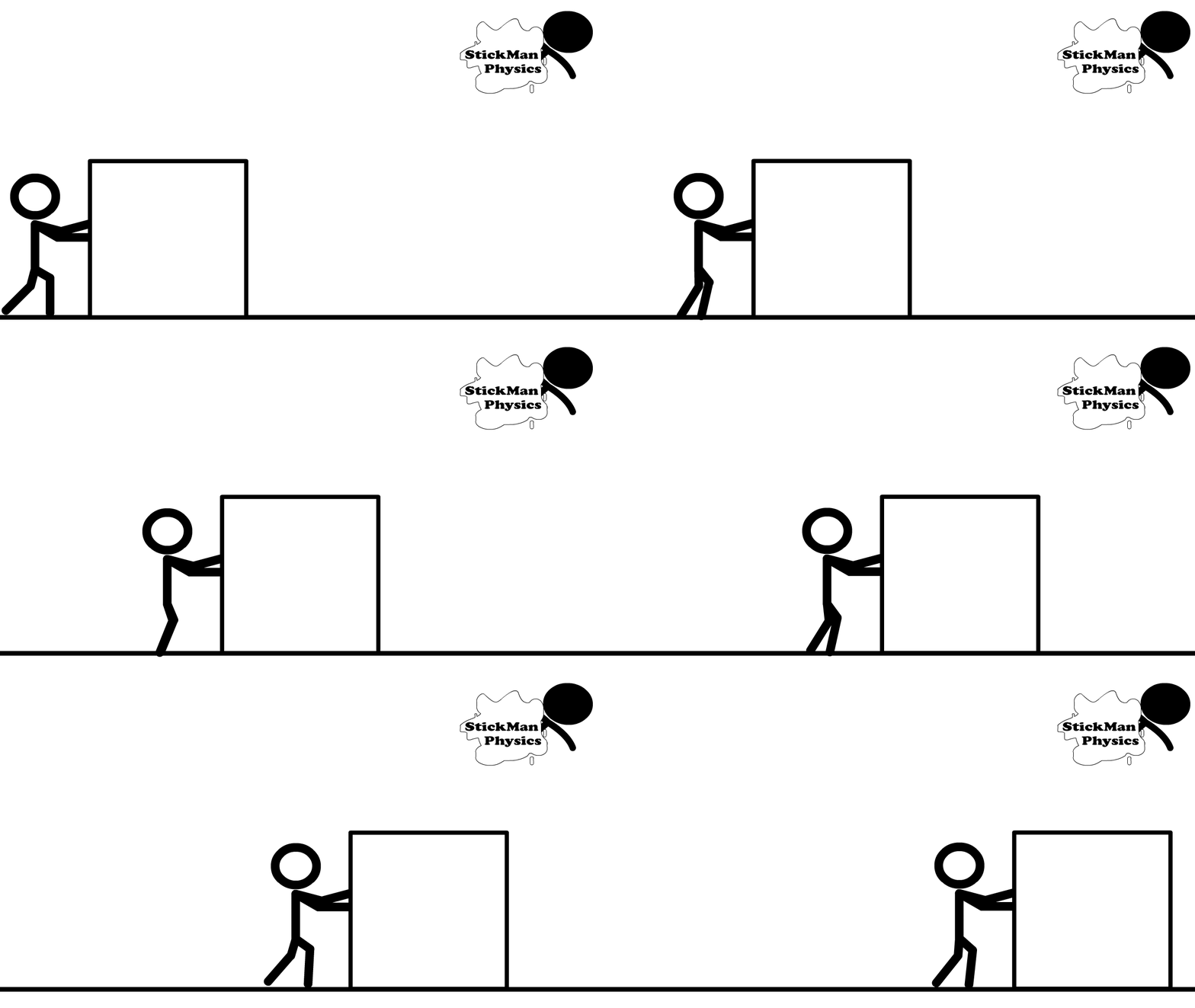
Fig. 2.2 Image Credit: stickmanphysics.com.#
If you traveled to Dallas from Commerce (\({\sim}60\ {\rm mi}\) away) in your car and the trip took \(1\ {\rm h}\). Then your average speed is a derived scalar quantity of \(60\ {\rm mi/h}\).
Checkpoint
A class lasts \(50\ {\rm min}\), but ends \(600\ {\rm s}\) early.
Can you subtract these quantities immediately, or must you convert units first?
2.1.3. What is a vector?#
A vector combines scalar quantities as a new object that delineates the quantities by their dimension. A unit vector represents a single step along a dimensional axis and is signified using the hat (or \(\hat{}\)) symbol over the variable for that axis. For example, 1 unit step along the x-axis is represented by \(\hat{x}\), which can be written as $\hat{x}$ a the text cell in your Jupyter notebook.
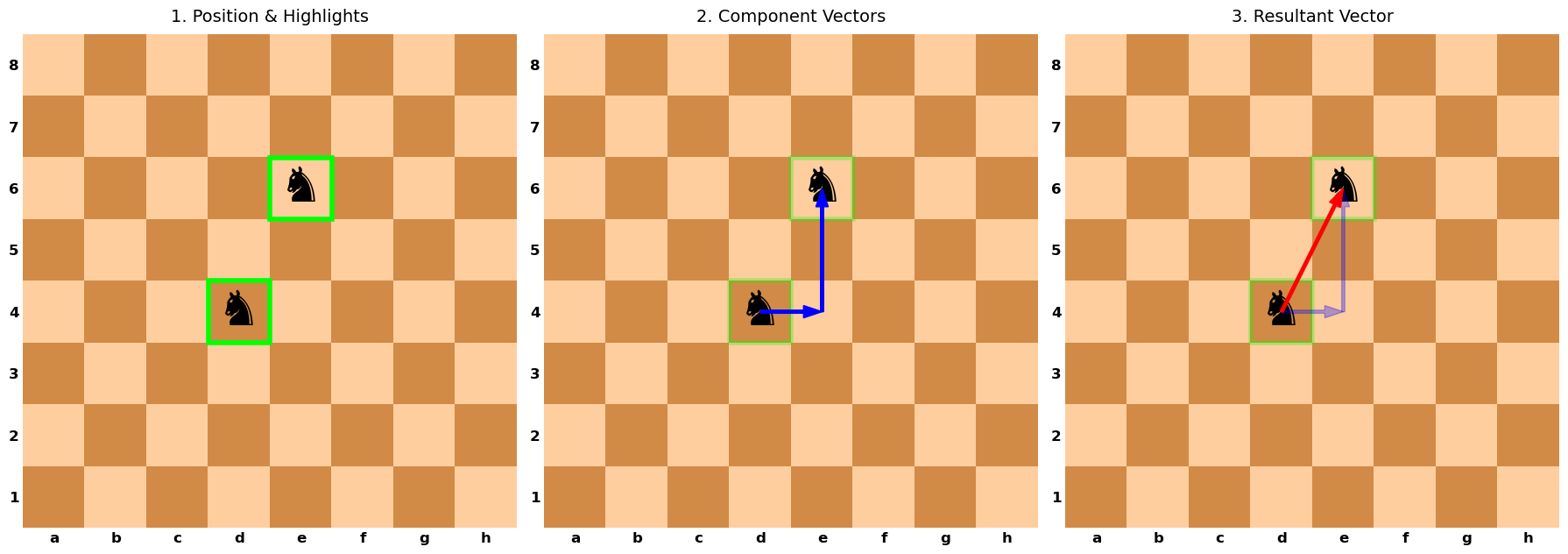
Consider a chessboard, where players designate letters and numbers to identify a piece at a particular location on the board. The chess pieces move as vectors to traverse the chessboard.
The knight moves in an \(L\)-shaped pattern that can include moving the piece either: one space horizontally, 2 spaces vertically or 2 spaces horizontally, 1 space vertically. Both of these choices represent a vector when we consider the initial and final locations of the knight.
Show code cell source
import matplotlib.pyplot as plt
import numpy as np
from matplotlib.colors import ListedColormap
import matplotlib.patches as patches

def draw_vector_panels():
    # 1. Setup Data and Colors
    dx, dy = np.meshgrid(np.arange(8), np.arange(8))
    board_grid = (dx + dy) % 2

    dark_color = '#D18B47'
    light_color = '#FFCE9E'
    cmap = ListedColormap([dark_color, light_color])

    files = ['a', 'b', 'c', 'd', 'e', 'f', 'g', 'h']
    ranks = ['1', '2', '3', '4', '5', '6', '7', '8']

    # Vector/Piece Coordinates
    x0, y0 = 3., 3.  # Start at d4
    kx, ky = 1, 2    # Knight move (1 right, 2 up)

    # 2. Create Subplots (1 Row, 3 Cols)
    fig, axes = plt.subplots(1, 3, figsize=(18, 6))

    # Helper function to draw the base board on any given axis
    def setup_board(ax):
        ax.imshow(board_grid, cmap=cmap, origin='lower')
        ax.set_xticks(np.arange(8))
        ax.set_xticklabels(files, fontsize=12, weight='bold')
        ax.set_yticks(np.arange(8))
        ax.set_yticklabels(ranks, fontsize=12, weight='bold')
        ax.tick_params(axis='both', which='both', length=0)

        # Clean borders
        for spine in ax.spines.values():
            spine.set_visible(False)

        # Place Pieces (Knights)
        # Using ha='center' aligns the text automatically to the grid center
        ax.text(x0, y0, '♞', color='k', fontsize=40, ha='center', va='center')
        ax.text(x0+kx, y0+ky, '♞', color='k', fontsize=40, ha='center', va='center')

    # --- PANEL 1: Pieces + Border Highlights ---
    ax1 = axes[0]
    setup_board(ax1)
    ax1.set_title("1. Position & Highlights", fontsize=14, pad=10)

    # Add Highlights (Rectangles around start and end cells)
    # Note: (x-0.5, y-0.5) is the bottom-left corner of a cell centered at (x,y)
    rect_start = patches.Rectangle((x0-0.5, y0-0.5), 1, 1, fill=False, edgecolor='#00FF00', linewidth=4)
    rect_end = patches.Rectangle((x0+kx-0.5, y0+ky-0.5), 1, 1, fill=False, edgecolor='#00FF00', linewidth=4)
    ax1.add_patch(rect_start)
    ax1.add_patch(rect_end)

    # --- PANEL 2: Add Component Vectors (Blue) ---
    ax2 = axes[1]
    setup_board(ax2)
    ax2.set_title("2. Component Vectors", fontsize=14, pad=10)

    # Keep highlights (optional, for continuity)
    ax2.add_patch(patches.Rectangle((x0-0.5, y0-0.5), 1, 1, fill=False, edgecolor='#00FF00', linewidth=4, alpha=0.3))
    ax2.add_patch(patches.Rectangle((x0+kx-0.5, y0+ky-0.5), 1, 1, fill=False, edgecolor='#00FF00', linewidth=4, alpha=0.3))

    # Blue Arrows
    # Horizontal component
    ax2.arrow(x0, y0, kx, 0, color='b', ls='-', width=0.05, length_includes_head=True, head_width=0.2, zorder=5)
    # Vertical component (starts where horizontal ended)
    ax2.arrow(x0+kx, y0, 0, ky, color='b', ls='-', width=0.05, length_includes_head=True, head_width=0.2, zorder=5)

    # --- PANEL 3: Add Resultant Vector (Red) ---
    ax3 = axes[2]
    setup_board(ax3)
    ax3.set_title("3. Resultant Vector", fontsize=14, pad=10)

    # Ghost previous elements
    ax3.add_patch(patches.Rectangle((x0-0.5, y0-0.5), 1, 1, fill=False, edgecolor='#00FF00', linewidth=4, alpha=0.3))
    ax3.add_patch(patches.Rectangle((x0+kx-0.5, y0+ky-0.5), 1, 1, fill=False, edgecolor='#00FF00', linewidth=4, alpha=0.3))
    ax3.arrow(x0, y0, kx, 0, color='b', ls='-', width=0.05, length_includes_head=True, head_width=0.2, zorder=5, alpha=0.3)
    ax3.arrow(x0+kx, y0, 0, ky, color='b', ls='-', width=0.05, length_includes_head=True, head_width=0.2, zorder=5, alpha=0.3)

    # Red Resultant Arrow
    ax3.arrow(x0, y0, kx, ky, color='r', ls='-', width=0.05, length_includes_head=True, head_width=0.2, zorder=6)

    plt.tight_layout()
    plt.show()

if __name__ == "__main__":
    draw_vector_panels()
A vector is also described as an object that has both magnitude and direction (see Figure 2.3).
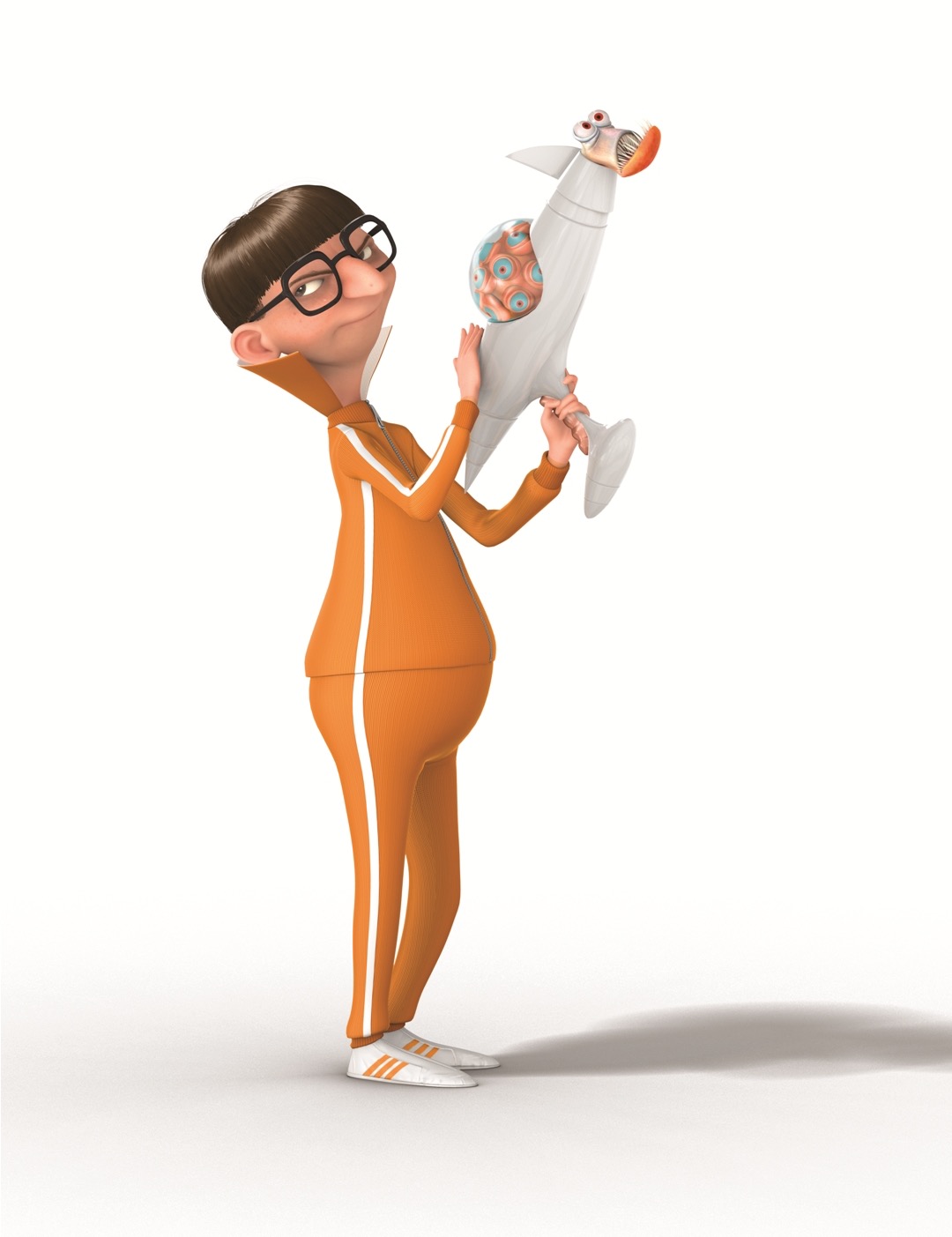
Fig. 2.3 Victor “Vector” Perkins demonstrating that he has both magnitude and direction. Image Credit: Illumination: Despicable Me.#
Physical quantities specified by giving a number of units (i.e., magnitude) and a direction (i.e., angle or up/down/left/right) are called vector quantities. Examples include:
position,
displacement (change in position),
velocity (change in position per time),
acceleration (change in velocity per time),
force,
torque.
Vectors can be combined together to make a new vector or multiplied by a scalar to create a vector of a new length. The chessboard example above showed the resultant vector is composed by the addition of two component vectors.
Vectors are distinguished from scalars using an arrow over the variable. Suppose we can identify the position vector of an object because it is \(2\ {\rm km}\) due east, then we can write the vector \(\vec{m} = 2 \hat{x}\ {\rm km}\), where \(\hat{x}\) represents the direction due east or along the positive x-axis. The \(\hat{x}\) is a unit vector with a length equal to 1.
Note
In your Jupiter notebook Markdown (text) cell, the \(\vec{m}\) is represented by $\vec{m}$, and the \(\hat{x}\) is represented by $\hat{x}$. Be sure to use The $ $ around your LaTeX symbols so they render properly. Click the link to see a cheat sheet for LaTeX commands.
The object \(\vec{m}\) is a vector because it has a magnitude (\(2\ {\rm km}\)) and a direction (\(\hat{x}\)). The magnitude can be written equivalently as \(m \equiv |\vec{m}|\)
What is the vector for an object that is \(2\ {\rm km}\) due west?
What is the vector for an object that is \(2\ {\rm km}\) due north/south?
Note that we have chosen the \(x\) in \(\hat{x}\) arbitrarily, where we could have used any other symbol. You might see that other textbooks use \(\hat{i}\) instead. If you dealing with a vector with an unknown magnitude in the positive \(x\) direction, then you can see where \(\vec{m} = x \hat{i}\) could be useful.
See the python script below, where it shows how to represent the vector \(\vec{m}= 2\hat{x}\) using the plotting library matplotlib.
Show code cell source
import matplotlib.pyplot as plt

fig = plt.figure(figsize=(6, 6))
ax = fig.add_subplot(111)
ax.grid(True,zorder=2)

#create m-vector using python
x0,y0,dx,dy = 0,0,2,0
ax.arrow(x0,y0,dx,dy,color='b', ls='-', width=0.04, length_includes_head=True, head_width=0.15,zorder=4)
ax.plot(x0,y0,'k.',ms=25,zorder=5)

# -------------------------------------------------
# Cardinal arrows in whitespace near x-axis label
# -------------------------------------------------
arrow_kw = dict(arrowprops=dict(arrowstyle='->', lw=2),
                xycoords='axes fraction',
                textcoords='axes fraction', fontsize='x-large',
                zorder=6)
# East arrow (+x, right)
ax.annotate('E', xy=(0.95, -0.09), xytext=(0.75, -0.09),
            ha='center', va='center', **arrow_kw)
# West arrow (-x, left)
ax.annotate('W',xy=(0.05, -0.09), xytext=(0.25, -0.09),
            ha='center', va='center', **arrow_kw)
# North arrow (+y, up)
ax.annotate('N',xy=(-0.15, 0.95), xytext=(-0.15, 0.75),
            ha='center', va='center', **arrow_kw)
# South arrow (-y, down)
ax.annotate('S',xy=(-0.15, 0.05), xytext=(-0.15, 0.25),
            ha='center', va='center', **arrow_kw)

ax.set_xlim(-3, 3)
ax.set_ylim(-1, 1)
ax.set_ylabel('$y$ (km)',fontsize='x-large')
ax.set_xlabel('$x$ (km)',fontsize='x-large')

plt.show()
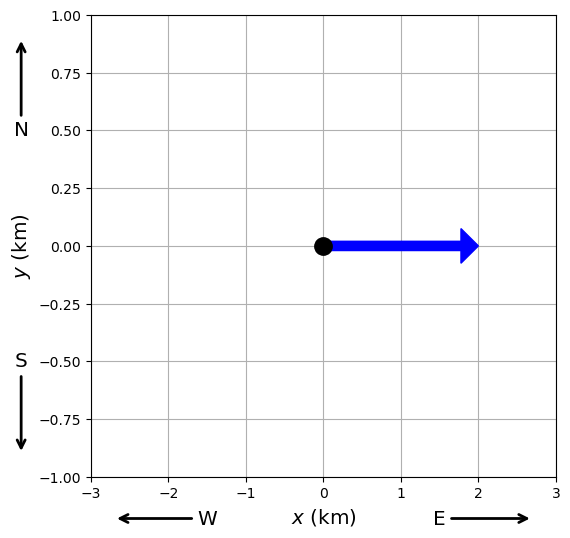
You can use the python code below as a template to plot your vectors in this chapter. Be sure to modify the limits/labels as needed.
import matplotlib.pyplot as plt

fig = plt.figure(figsize=(6, 6))
ax = fig.add_subplot(111)
ax.grid(True,zorder=2)

#create vector using python
x0,y0,dx,dy = 0,0,2,0
ax.arrow(x0,y0,dx,dy,color='b', ls='-', width=0.04, length_includes_head=True, head_width=0.15,zorder=4)
ax.plot(x0,y0,'k.',ms=25,zorder=5)

ax.set_xlim(-3, 3)
ax.set_ylim(-1, 1)
ax.set_ylabel('$y$ (km)',fontsize='x-large')
ax.set_xlabel('$x$ (km)',fontsize='x-large')

plt.show()
In general, we define \(\vec{D}\) as the displacement vector, where it measures the change in a position vector. The displacement vector can be the resultant vector of two other vectors \(\vec{A}\) and \(\vec{B}\). Figure 2.4 shows how these 2 vectors can be oriented relative to each other.
Fig. 2.4 Various relations between two vectors \(\vec{A}\) and \(\vec{B}\). Figure Credit: OpenStax: Scalars and Vectors.#
Suppose that you’re walking from your tent at position \(A\) and going to a pond at position \(B\). It’s easier to keep track of your displacement \(\vec{D}\) by using subscripts denoting the intended source location and final destination (see Figure 2.5).
Fig. 2.5 The displacement vector from point A (the initial position at the campsite) to point B (the final position at the fishing hole) is indicated by an arrow with origin at point A and end at point B. The displacement is the same for any of the actual paths (dashed curves) that may be taken between points A and B. Figure Credit: OpenStax: Scalars and Vectors.#
Mathematically, \(\vec{D}_{AB}\) represents the displacement vector from \(A\) to \(B\), where the opposite \(\vec{D}_{BA} = -\vec{D}_{AB}\) because you would only need to walk in the opposite (\(-\)) direction. We can also say that \(\vec{D}_{BA}\) is antiparallel to \(\vec{D}_{AB}\).
Two vectors that have identical directions are parallel to each other.
Two vectors that are perpendicular to each other are also said to be orthogonal vectors.
Checkpoint
A vector has magnitude \(5\) and points to the left.
What information is missing if you only write the number \(5\)?
2.1.4. Algebra of Vectors in 1D#
Fig. 2.6 Displacement vectors for a fishing trip. (a) Stopping to rest at point C while walking from camp (point A) to the pond (point B). (b) Going back for the dropped fishing lure (point D). (c) Finishing up at the fishing pond. Figure Credit: OpenStax: Scalars and Vectors.#
Figure 2.6 shows three scenarios for your friend who walks from the campsite to the fishing pond. He wants to walk from point A to B, or have a displacement vector \(\vec{D}_{AB}\). Let’s see how is vector is modified when he
stops to rest at point C,
realizes that he dropped his prize lure and has to go back to a point D,
continues from point D and arrives at the fishing pond at point B.
The python script below represents the vector \(\vec{D}_{AB}\), where I’ve chosen a \(45^\circ\) angle for illustration only.
Show code cell source
import matplotlib.pyplot as plt
import numpy as np

fs='x-large'

fig = plt.figure(figsize=(6, 6))
ax = fig.add_subplot(111)
ax.grid(True,zorder=2,alpha=0.4)

#components of a unit vector u
theta = np.pi/4
ux, uy = np.cos(theta), np.sin(theta)

#Vector D_AB = 6*u
mag_D_AB = 6
x0,y0,dx,dy = 0,0,mag_D_AB*ux,mag_D_AB*uy
ax.arrow(x0,y0,dx,dy,color='b', ls='-', width=0.04, length_includes_head=True, head_width=0.2,zorder=4)
ax.plot(x0,y0,'k.',ms=25,zorder=5)
ax.plot(x0+mag_D_AB*ux,y0+mag_D_AB*uy,'c.',ms=25,zorder=5)
ax.text(dx/2-0.25,dy/2+0.25,'$\\vec{D}_{AB}$',rotation=45,fontsize=fs,color='b')

ax.set_xlim(-1, 6)
ax.set_ylim(-1, 6)
ax.set_ylabel('$y$ (km)',fontsize='x-large')
ax.set_xlabel('$x$ (km)',fontsize='x-large')

plt.show()
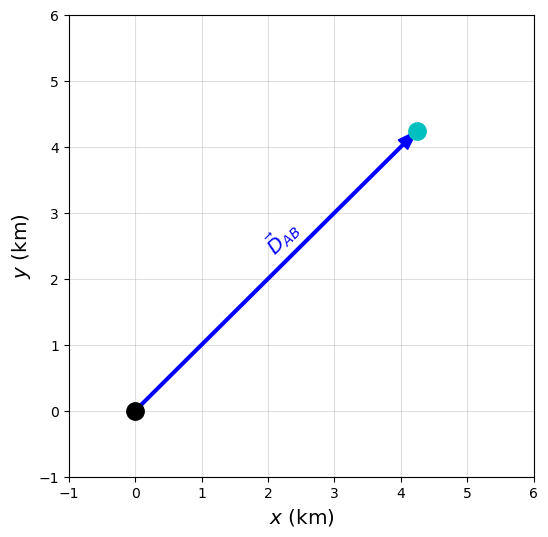
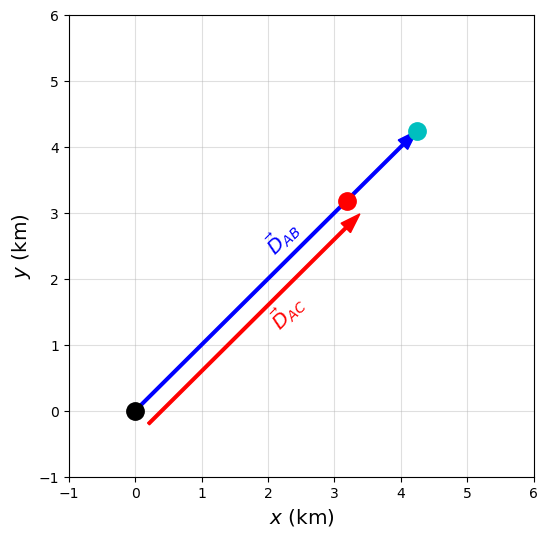
Your friend rests at point C, which is \(3/4\) of the way to the pond. We also know that the full distance from the campsite to the pond is \(6\ {\rm km}\). What is his displacement vector \(\vec{D}_{AC}\) when he stops to rest?
Notice that the vector in panel (a) is not along the x-axis, but in a northeasterly direction. In this question, we apply a unit vector \(\hat{u}\) so that we can define:
There could be some transformation to decompose \(\hat{u}\rightarrow x\hat{i} + y\hat{j}\), but we do not need to know (in this case) as long as we express all other vectors either parallel or antiparallel to \(\hat{u}\).
Do you think \(\vec{D}_{AC}\) is parallel or antiparallel to \(\vec{D}_{AB}\)?
Since your fiend is walking in the direction \(\hat{u}\), his vector at point C is parallel to the path from the campsite to the pond. Then we can scale the original vector by the fraction of the total distance traveled (i.e., \(3/4\) (or \(0.75\)) of the way).
Scaling a vector
To scale a vector, you simply multiply by a scalar (i.e., a number), let’s call it \(\alpha\). If \(\alpha\) is:
\(< 1\), then it shrinks the vector.
\(=1\), then it copies the vector exactly.
\(>1\), then it enlarges the vector.
In all three cases, the direction of the new vector is preserved (i.e., unchanged) relative to the old vector, although the magnitude of the new vector can be different.
We can represent the vector \(\vec{D}_{AC}\) as
Note that we have 2 ways to represent the new vector.
The magnitude of \(\vec{D}_{AB}\) is represented by \(|\vec{D}_{AB}| = 6\ {\rm km}\). We found the second form by multiplying the scalar \(\alpha = 0.75\) by the scalar \(|\vec{D}_{AB}|\). Therefore we know the magnitude of \(\vec{D}_{AC}\) is
In general,
a scalar multiplied by a vector creates a new vector, \(\vec{B} = \alpha\vec{A}\).
a scalar multiplied by a scalar creates a new scalar, \(|\vec{B}| = \alpha|\vec{A}|\).
The python script below represents the vectors \(\vec{D}_{AB}\) and \(\vec{D}_{AC}\), graphically.
Show code cell source
import matplotlib.pyplot as plt
import numpy as np

fs = 'x-large'

fig = plt.figure(figsize=(6, 6))
ax = fig.add_subplot(111)
ax.grid(True,zorder=2,alpha=0.4)

#components of a unit vector u
theta = np.pi/4
ux, uy = np.cos(theta), np.sin(theta)

#Vector D_AB = 6*u
mag_D_AB = 6
x0,y0,dx,dy = 0,0,mag_D_AB*ux,mag_D_AB*uy
ax.arrow(x0,y0,dx,dy,color='b', ls='-', width=0.04, length_includes_head=True, head_width=0.2,zorder=4)
ax.text(dx/2-0.25,dy/2+0.25,'$\\vec{D}_{AB}$',rotation=45,fontsize=fs,color='b')

#Vector D_AC = 0.75*D_AB
mag_D_AC = 0.75
xshift, yshift = 0.2, -0.2 #shifts only so the both vectors are visible
x0,y0,dx,dy = 0,0,mag_D_AC*mag_D_AB*ux,mag_D_AC*mag_D_AB*uy
ax.arrow(x0+xshift,y0+yshift,dx,dy,color='r', ls='-', width=0.04, length_includes_head=True, head_width=0.2,zorder=4)
ax.text(dx/2+0.35,dy/2-0.35,'$\\vec{D}_{AC}$',rotation=45,fontsize=fs,color='r')

ax.plot(x0,y0,'k.',ms=25,zorder=5)
ax.plot(x0+mag_D_AB*ux,y0+mag_D_AB*uy,'c.',ms=25,zorder=5)
ax.plot(x0+mag_D_AC*mag_D_AB*ux,y0+mag_D_AC*mag_D_AB*uy,'r.',ms=25,zorder=5)

ax.set_xlim(-1, 6)
ax.set_ylim(-1, 6)
ax.set_ylabel('$y$ (km)',fontsize='x-large')
ax.set_xlabel('$x$ (km)',fontsize='x-large')

plt.show()
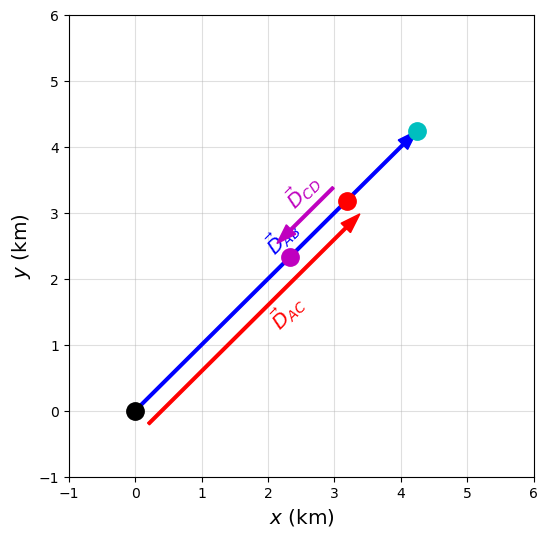
Your friend now realizes that he dropped his prize lure and has to go back to look for it and finds it at a a point D that is \(1.2\ {\rm km}\) from point C. We can represent his new path as a vector \(\vec{D}_{CD}\).
Do you think \(\vec{D}_{CD}\) is parallel or antiparallel to \(\vec{D}_{AB}\)?
Since he had to retrace his steps, the vector \(\vec{D}_{CD}\) will have a direction that is opposite to \(\vec{D}_{AC}\) (and \(\vec{D}_{AB}\).
We can represent the vector \(\vec{D}_{CD}\) as
Show code cell source
import matplotlib.pyplot as plt
import numpy as np

fs = 'x-large'

fig = plt.figure(figsize=(6, 6))
ax = fig.add_subplot(111)
ax.grid(True,zorder=2,alpha = 0.4)

#components of a unit vector u
theta = np.pi/4
ux, uy = np.cos(theta), np.sin(theta)

#Vector D_AB = 6*u
mag_D_AB = 6
x0,y0,AB_dx,AB_dy = 0,0,mag_D_AB*ux,mag_D_AB*uy
ax.arrow(x0,y0,AB_dx,AB_dy,color='b', ls='-', width=0.04, length_includes_head=True, head_width=0.2,zorder=4)
ax.text(AB_dx/2-0.25,AB_dy/2+0.25,'$\\vec{D}_{AB}$',rotation=45,fontsize=fs,color='b',zorder=4)

#Vector D_AC = 0.75*D_AB
mag_D_AC = 0.75
xshift, yshift = 0.2, -0.2 #shifts only so the both vectors are visible
x0,y0,AC_dx,AC_dy = 0,0,mag_D_AC*mag_D_AB*ux,mag_D_AC*mag_D_AB*uy
ax.arrow(x0+xshift,y0+yshift,AC_dx,AC_dy,color='r', ls='-', width=0.04, length_includes_head=True, head_width=0.2,zorder=4)
ax.text(AC_dx/2+0.35,AC_dy/2-0.35,'$\\vec{D}_{AC}$',rotation=45,fontsize=fs,color='r')

#Vector D_CD = -0.2*D_AB
mag_D_CD = -0.2
xshift, yshift = -0.2, 0.2 #shifts only so the both vectors are visible
x0,y0,CD_dx,CD_dy =0,0,mag_D_CD*mag_D_AB*ux,mag_D_CD*mag_D_AB*uy
ax.arrow(AC_dx+xshift,AC_dy+yshift,CD_dx,CD_dy,color='m', ls='-', width=0.04, length_includes_head=True, head_width=0.2,zorder=4)
ax.text(AC_dx+2*CD_dx/3-0.45,AC_dy+2*CD_dy/3+0.45,'$\\vec{D}_{CD}$',rotation=45,fontsize=fs,color='m')

x0,y0 = 0,0
ax.plot(x0,y0,'k.',ms=25,zorder=5)
ax.plot(x0+AB_dx,y0+AB_dy,'c.',ms=25,zorder=5)
ax.plot(x0+AC_dx,y0+AC_dy,'r.',ms=25,zorder=5)
ax.plot(x0+AC_dx+CD_dx,y0+AC_dy+CD_dy,'m.',ms=25,zorder=5)

ax.set_xlim(-1, 6)
ax.set_ylim(-1, 6)
ax.set_ylabel('$y$ (km)',fontsize='x-large')
ax.set_xlabel('$x$ (km)',fontsize='x-large')

plt.show()
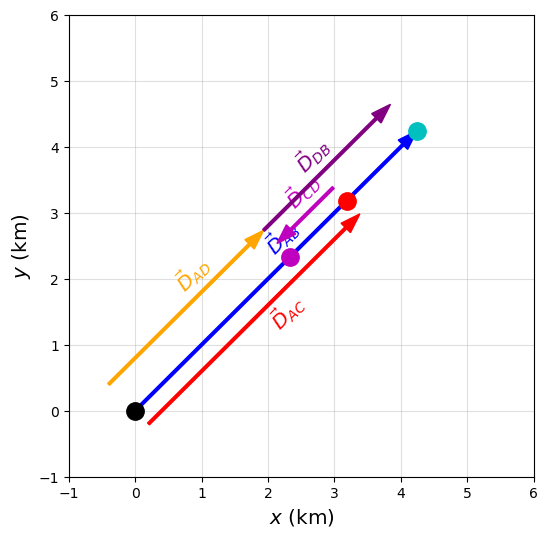
Furthermore, we can represent your friends displacement vector relative to:
the campsite by \(\vec{D}_{AD}\), or
the fishing pond \(\vec{D}_{DB}\).
Since your friend had to turn back, he wants to know which location (campsite or fishing hole) is closer. He’s not much of a hiker, and just wants to go to the closer location.
We can find either vector \(\vec{D}_{AD}\) or \(\vec{D}_{DB}\) using a combination of the vectors we already know. We can deduce \(\vec{D}_{AD}\) by the addition (or difference) of \(\vec{D}_{AB}\) with \(\vec{D}_{AC}\) and \(\vec{D}_{CD}\). Let’s start by defining:
The vector \(\vec{D}_{AD}\) simply represents your friend’s total path accounting for a change in direction. Through substitution, we have
We can find \(\vec{D}_{DB}\) through another deduction by,
Together, we can take the magnitude of each vector to find that
\(|\vec{D}_{AD}| = 3.3\ {\rm km}\) back to the campsite, and
\(|\vec{D}_{AD}| = 2.7\ {\rm km}\) to the pond.
It looks like your friend is going fishing after all.
Does this make sense?
We should expect that \(\vec{D}_{AD} + \vec{D}_{DB} = \vec{D}_{AB}\), which we can see this in our graph.
Checkpoint
A particle moves from \(x_o = -3\ {\rm m}\) to \(x_f = +2\ {\rm m}\).
Is the displacement positive, negative, or zero?
Show code cell source
import matplotlib.pyplot as plt
import numpy as np

fs = 'x-large'

fig = plt.figure(figsize=(6, 6))
ax = fig.add_subplot(111)
ax.grid(True,zorder=2,alpha=0.4)

#components of a unit vector u
theta = np.pi/4
ux, uy = np.cos(theta), np.sin(theta)

#Vector D_AB = 6*u
mag_D_AB = 6
x0,y0,AB_dx,AB_dy = 0,0,mag_D_AB*ux,mag_D_AB*uy
ax.arrow(x0,y0,AB_dx,AB_dy,color='b', ls='-', width=0.04, length_includes_head=True, head_width=0.2,zorder=4)
ax.text(AB_dx/2-0.25,AB_dy/2+0.25,'$\\vec{D}_{AB}$',rotation=45,fontsize=fs,color='b',zorder=4)

#Vector D_AC = 0.75*D_AB
mag_D_AC = 0.75#D_AB
xshift, yshift = 0.2, -0.2 #shifts only so the both vectors are visible
x0,y0,AC_dx,AC_dy = 0,0,mag_D_AC*mag_D_AB*ux,mag_D_AC*mag_D_AB*uy
ax.arrow(x0+xshift,y0+yshift,AC_dx,AC_dy,color='r', ls='-', width=0.04, length_includes_head=True, head_width=0.2,zorder=4)
ax.text(AC_dx/2+0.35,AC_dy/2-0.35,'$\\vec{D}_{AC}$',rotation=45,fontsize=fs,color='r')

#Vector D_CD = -0.2*D_AB
mag_D_CD = -0.2 #D_AB
xshift, yshift = -0.2, 0.2 #shifts only so the both vectors are visible
x0,y0,CD_dx,CD_dy =0,0,mag_D_CD*mag_D_AB*ux,mag_D_CD*mag_D_AB*uy
ax.arrow(AC_dx+xshift,AC_dy+yshift,CD_dx,CD_dy,color='m', ls='-', width=0.04, length_includes_head=True, head_width=0.2,zorder=4)
ax.text(AC_dx+2*CD_dx/3-0.45,AC_dy+2*CD_dy/3+0.45,'$\\vec{D}_{CD}$',rotation=45,fontsize=fs,color='m')

#Vector D_AD = D_AC + D_CD
mag_D_AD = 0.55 #D_AB
xshift, yshift = -0.4, 0.4 #shifts only so the both vectors are visible
x0,y0,AD_dx,AD_dy =0,0,mag_D_AD*mag_D_AB*ux,mag_D_AD*mag_D_AB*uy
ax.arrow(xshift,yshift,AD_dx,AD_dy,color='orange', ls='-', width=0.04, length_includes_head=True, head_width=0.2,zorder=4)
ax.text(AD_dx/2-0.65,AD_dy/2+0.65,'$\\vec{D}_{AD}$',rotation=45,fontsize=fs,color='orange')

#Vector D_DB = D_AB + D_AD
mag_D_DB = 0.45 #D_AB
xshift, yshift = -0.4, 0.4 #shifts only so the both vectors are visible
x0,y0,DB_dx,DB_dy = 0,0,mag_D_DB*mag_D_AB*ux,mag_D_DB*mag_D_AB*uy
ax.arrow(AC_dx+CD_dx+xshift,AC_dy+CD_dy+yshift,DB_dx,DB_dy,color='purple', ls='-', width=0.04, length_includes_head=True, head_width=0.2,zorder=4)
ax.text(AC_dx+CD_dx+DB_dx/3-0.65,AC_dy+CD_dy+DB_dy/3+0.65,'$\\vec{D}_{DB}$',rotation=45,fontsize=fs,color='purple')

x0,y0 = 0,0
ax.plot(x0,y0,'k.',ms=25,zorder=5)
ax.plot(x0+AB_dx,y0+AB_dy,'c.',ms=25,zorder=5)
ax.plot(x0+AC_dx,y0+AC_dy,'r.',ms=25,zorder=5)
ax.plot(x0+AC_dx+CD_dx,y0+AC_dy+CD_dy,'m.',ms=25,zorder=5)

ax.set_xlim(-1, 6)
ax.set_ylim(-1, 6)
ax.set_ylabel('$y$ (km)',fontsize='x-large')
ax.set_xlabel('$x$ (km)',fontsize='x-large')

plt.show()
2.1.5. Properties of vectors#
The resultant vector \(\vec{R}\) of two vectors \(\vec{A}\) and \(\vec{B}\) can be determined by the addition of the two vectors as
When we draw the resultant vector, we place them the tail at the origin and draw to place the head at the final location (i.e., head-to-tail method). In our above example, \(\vec{D}_{AD}\) was the resultant vector of the \(\vec{D}_{AC} + \vec{D}_{CD}\).
In general, vectors have similar properties as scalars. We can:
add any number of vectors in any order, where vector addition is commutative.
\[ \vec{A} + \vec{B} = \vec{B} + \vec{A} \]group the addition of vectors in any order, where vector addition is associative.
\[ (\vec{A} + \vec{B}) + \vec{C} = \vec{A} + (\vec{B} + \vec{C}) \]distribute scalar(s) across vector(s), where vector multiplication is distributive.
(2.9)#\[\begin{align} (\alpha + \beta)\vec{A} &= \alpha \vec{A} + \beta\vec{A}, \\ \alpha(\vec{A}+\vec{B}) &= \alpha \vec{A} + \alpha \vec{B}. \end{align}\]
2.1.5.1. Example Problem: Ladybug walking on a stick#
Exercise 2.1
The Problem
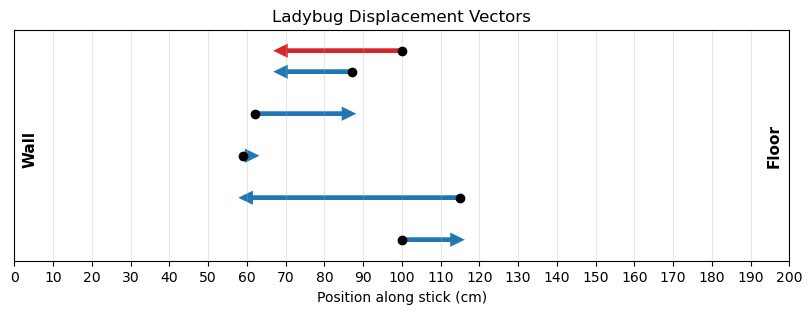
A long measuring stick rests against a wall in a physics laboratory with its 200-cm end at the floor. A ladybug lands at the 100-cm mark and crawls randomly along the stick. It first walks 15 cm toward the floor, then it walks 56 cm toward the wall, then it walks 3 cm toward the floor again. Then, after a brief stop, it continues 25 cm toward the floor and then, again, it crawls 19 cm toward the wall before coming to a complete rest. Find the vector of the total displacement, and its final resting position on the stick.
The Model
We model the ladybug’s motion as one-dimensional motion along the length of the measuring stick. The stick defines a single axis, so each part of the motion is either in the positive direction or the negative direction along that axis.
We choose the direction toward the floor as positive and represent that direction with the unit vector \(\hat{u}\). Motion toward the wall is therefore in the negative \(\hat{u}\) direction. The net displacement is found by treating each crawl segment as a signed displacement along the same line.
The Math
The five displacement vectors are
The total displacement vector is
The Conclusion
The ladybug’s total displacement vector is \(\vec{D} = -32\ \text{cm}\,\hat{u}.\) The negative sign means the net displacement is toward the wall. Since the ladybug started at the \(100\)-cm mark, the final position is the \(68\)-cm mark on the measuring stick.
The Verification
The Python calculation represents each crawl segment as a signed displacement along the stick. The code computes the same signed sum used in the analytical solution and draws the individual displacements along the measuring-stick axis.
import numpy as np
import matplotlib.pyplot as plt

# Displacements in cm (positive = toward floor)
D = np.array([15, -56, 3, 25, -19])

# Starting position (cm)
x0 = 100

positions = np.concatenate([[x0], x0 + np.cumsum(D)]) # Cumulative positions
y_offsets = np.linspace(0, 4, len(D)) # Vertical offsets for visual separation

fig, ax = plt.subplots(figsize=(10, 3))

# Draw each displacement as a separate arrow
for i, (dx, y) in enumerate(zip(D, y_offsets)):
    ax.arrow(positions[i], y, dx, 0, length_includes_head=True, head_width=0.18, head_length=2, linewidth=3, color='tab:blue')
    ax.plot(positions[i], y, 'ko', ms=6)
# Draw the resultant vector
ax.arrow(100, 4.5, D.sum(), 0, length_includes_head=True, head_width=0.18, head_length=2, linewidth=3, color='tab:red')
ax.plot(100, 4.5, 'ko', ms=6)
# Label the Floor and Wall
ax.text(196, 1.8, 'Floor', ha='center', rotation=90,fontsize=11,fontweight='bold')
ax.text(4, 1.8, 'Wall', ha='center', rotation=90,fontsize=11,fontweight='bold')

# Formatting
ax.set_xlim(0, 200)
ax.set_ylim(-0.5, 5)
ax.set_yticks([])
ax.set_xticks(np.arange(0,210,10))
ax.set_xlabel('Position along stick (cm)')
ax.set_title('Ladybug Displacement Vectors')
ax.grid(True, axis='x', alpha=0.3)

plt.show()

print(f"The total displacement is {D.sum()} cm, " f"so the final position is {x0 + D.sum()} cm.")
The total displacement is -32 cm, so the final position is 68 cm.
2.1.6. Algebra of Vectors in 2D#
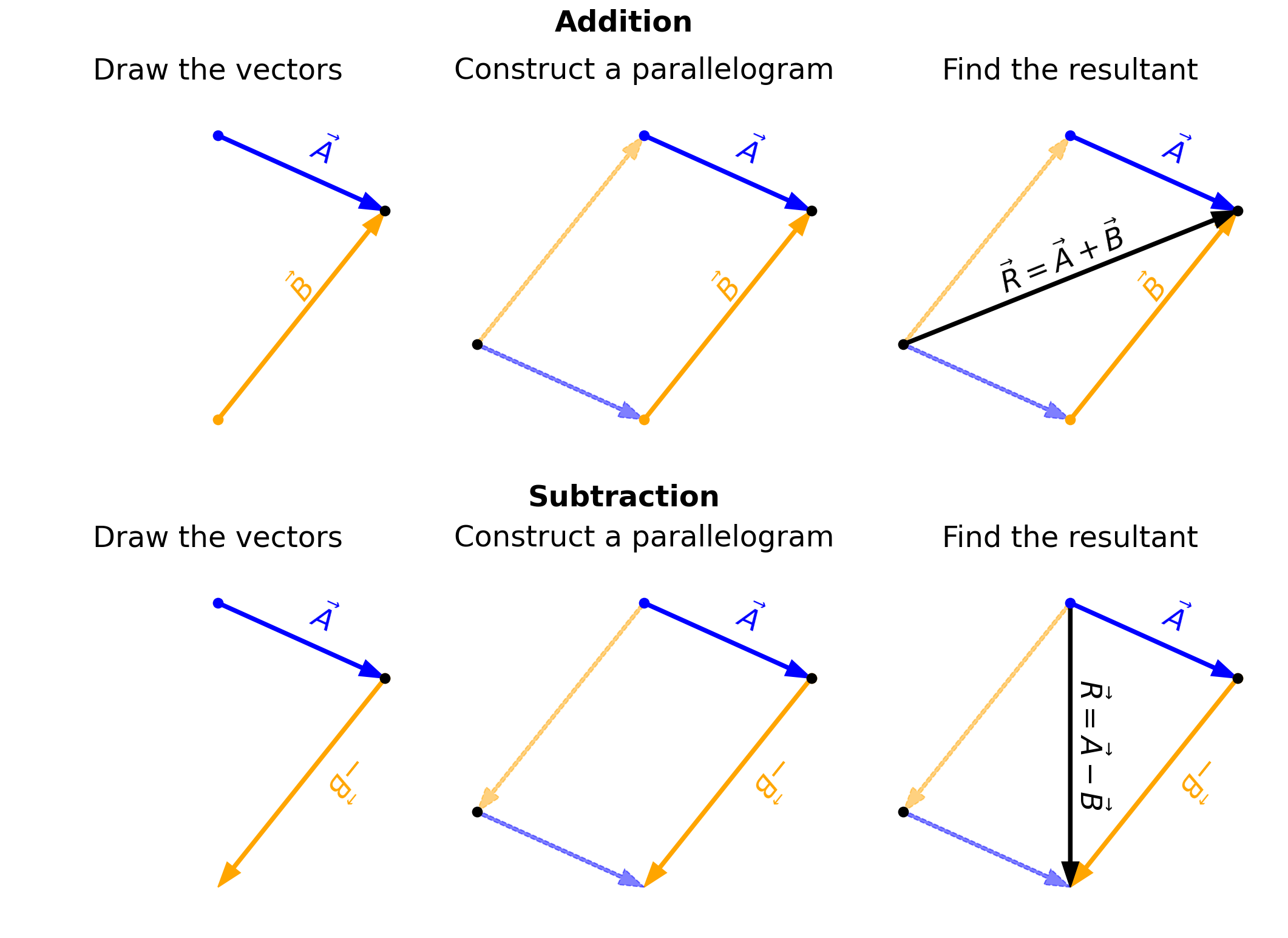
Vectors can be oriented in any direction (i.e., not just parallel or antiparallel). This complicates their addition, where you cannot simply add their magnitudes to determine the resultant vector. Instead, we must use geometry to construct the resultant vector and trigonometry to find vector magnitudes and directions.
For a geometric construction of the sum of two vectors in a plane (i.e., 2D), we follow the parallelogram rule. In the figure below, it shows two ways to construct a vector graphically.
Fig. 2.7 The parallelogram rule for the addition of two vectors. Figure Credit: OpenStax: Scalars and Vectors.#
To add two vectors (\(\vec{A} + \vec{B}\) ), we construct a parallelogram by shifting each vector to a parallel copy so that we can trace a path from the origin to the opposite corner of the parallelogram. The subtraction of two vectors (\(\vec{A}-\vec{B}\)) is performed in a similar way as shown in the figure below. However, notice a key difference:
in our example of vector addition, we had to move at least one vector so we could use the tail-to-head geometric construction.
in our example of vector subtraction, the resultant vector connects the blue dots, not the black dots (i.e., the other cross-piece of the parallelogram).
Show code cell source
import matplotlib.pyplot as plt
import numpy as np
from matplotlib import rcParams

rcParams.update({'font.size': 16})

def label_vector(ax, x0, y0, dx, dy, text, color, fontsize, offset=0.10, center=False):
    xm, ym = x0 + dx/2, y0 + dy/2
    nx, ny = -dy, dx
    n = (nx**2 + ny**2)**0.5
    nx, ny = nx/n, ny/n
    angle = np.degrees(np.arctan2(dy, dx))
    if center:
        ax.text(xm + offset*nx, ym + offset*ny,text, color=color, fontsize=fontsize,rotation=angle, ha='center', va='center')
    else:
        ax.text(xm + offset*nx, ym + offset*ny, text, color=color, fontsize=fontsize, rotation=angle)
    return

fs = 'x-large'

fig = plt.figure(figsize=(18,12), dpi=150)
ax1 = fig.add_subplot(231)
ax2 = fig.add_subplot(232)
ax3 = fig.add_subplot(233)
ax4 = fig.add_subplot(234)
ax5 = fig.add_subplot(235)
ax6 = fig.add_subplot(236)

ax_list_add = [ax1,ax2,ax3]
ax_list_sub = [ax4,ax5,ax6]

Ax, Ay = 1.0, -0.45
Bx, By = 1.0,  1.25
aw, hw = 0.02, 0.1
panel_titles = ["Draw the vectors","Construct a parallelogram","Find the resultant"]

for row,(ax_list,op,rowlab) in enumerate([(ax_list_add,'add',"Addition"),(ax_list_sub,'sub',"Subtraction")]):
    xA0, yA0 = 0.0, 0.5
    xMeet, yMeet = xA0+Ax, yA0+Ay
    if op == 'add':
        xB0, yB0 = xMeet-Bx, yMeet-By
        xQ, yQ = xB0-Ax, yB0-Ay
        pts = np.array([[xA0,yA0],[xB0,yB0],[xMeet,yMeet],[xQ,yQ]])
        xmin,xmax = pts[:,0].min(), pts[:,0].max()
        ymin,ymax = pts[:,1].min(), pts[:,1].max()
        dxm,dym = 0.25,0.25
    else:
        Bx_s, By_s = -Bx, -By
        xB0, yB0 = xMeet, yMeet
        xEnd, yEnd = xB0+Bx_s, yB0+By_s
        pts = np.array([[xA0,yA0],[xMeet,yMeet],[xEnd,yEnd],[xA0+Bx_s,yA0+By_s]])
        xmin,xmax = pts[:,0].min(), pts[:,0].max()
        ymin,ymax = pts[:,1].min(), pts[:,1].max()
        dxm,dym = 0.25,0.25
    for i,ax in enumerate(ax_list):
        ax.arrow(xA0,yA0,Ax,Ay,color='b', ls='-', width=aw, length_includes_head=True, head_width=hw)
        label_vector(ax,xA0,yA0,Ax,Ay,r'$\vec{A}$','b',fs,offset=0.06)
        ax.plot(xA0,yA0,'b.',ms=15)
        if op == 'add':
            ax.arrow(xB0,yB0,Bx,By,color='orange', ls='-', width=aw, length_includes_head=True, head_width=hw)
            label_vector(ax,xB0,yB0,Bx,By,r'$\vec{B}$','orange',fs,offset=0.14)
            ax.plot(xB0,yB0,'.',color='orange',ms=15)
            ax.plot(xMeet,yMeet,'k.',ms=15)
            if i > 0:
                ax.arrow(xQ,yQ,Ax,Ay,color='b', ls='--', alpha=0.5, width=aw, length_includes_head=True, head_width=hw)
                ax.arrow(xQ,yQ,Bx,By,color='orange', ls='--', alpha=0.5, width=aw, length_includes_head=True, head_width=hw)
                ax.plot(xQ,yQ,'k.',ms=15)
            if i == 2:
                Rx, Ry = xMeet-xQ, yMeet-yQ
                ax.arrow(xQ,yQ,Rx,Ry,color='k', ls='-', width=aw, length_includes_head=True, head_width=hw)
                label_vector(ax, xQ, yQ, Rx, Ry,r'$\vec{R}=\vec{A}+\vec{B}$','k', fs, offset=0.12, center=True)

        else:
            ax.arrow(xB0,yB0,Bx_s,By_s,color='orange', ls='-', width=aw, length_includes_head=True, head_width=hw)
            label_vector(ax,xB0,yB0,Bx_s,By_s,r'$-\vec{B}$','orange',fs,offset=0.14)
            ax.plot(xB0,yB0,'.',color='orange',ms=15)
            ax.plot(xMeet,yMeet,'k.',ms=15)
            if i > 0:
                ax.arrow(xA0,yA0,Bx_s,By_s,color='orange', ls='--', alpha=0.5, width=aw, length_includes_head=True, head_width=hw)
                ax.arrow(xA0+Bx_s,yA0+By_s,Ax,Ay,color='b', ls='--', alpha=0.5, width=aw, length_includes_head=True, head_width=hw)
                ax.plot(xA0+Bx_s,yA0+By_s,'k.',ms=15)
            if i == 2:
                Rx, Ry = xEnd-xA0, yEnd-yA0
                ax.arrow(xA0,yA0,Rx,Ry,color='k', ls='-', width=aw, length_includes_head=True, head_width=hw)
                label_vector(ax, xA0, yA0, Rx, Ry,r'$\vec{R}=\vec{A}-\vec{B}$','k', fs, offset=0.12, center=True)
        ax.set_aspect('equal')
        ax.set_xlim(xmin-dxm,xmax+dxm)
        ax.set_ylim(ymin-dym,ymax+dym)
        ax.set_xticks([])
        ax.set_yticks([])
        ax.set_xlabel('')
        ax.set_ylabel('')
        ax.set_title(panel_titles[i], fontsize=fs, pad=12)
        for spine in ax.spines.values():
            spine.set_visible(False)

fig.text(0.5,0.955,"Addition",ha='center',va='top',fontsize=fs,fontweight='bold')
fig.text(0.5,0.495,"Subtraction",ha='center',va='bottom',fontsize=fs,fontweight='bold')

plt.subplots_adjust(wspace=0.02, hspace=0.25)
plt.show()
The method of tail-to-head geometric construction can be generalized to combined multiple vectors together. Consider that we have four vectors \(\vec{A},\ \vec{B},\ \vec{C},\ \text{and } \vec{D}\) as shown below.
Fig. 2.8 Tail-to-head method for drawing the resultant vector \(\vec{R} = \vec{A} + \vec{B} + \vec{C} +\vec{D}.\) Image Credit: OpenStax: Scalars and Vectors.#
We can select any one of the vectors to start with because vector addition is commutative and associative, where the resultant \(\vec{R} = \vec{A} + \vec{B} + \vec{C} + \vec{D}\).
Starting with \(\vec{D}\), we make a parallel translation of a
second vector \(\vec{A}\) to a position where its “tail” (i.e., origin) coincides with the “head” (i.e., end) of the first vector \(\vec{D}\).
third vector \(\vec{C}\) to a position where its origin coincides with the end of the second vector \(\vec{A}\).
fourth vector \(\vec{B}\) to a position where its origin coincides with the end of the third vector \(\vec{C}\).
We draw the resultant vector \(\vec{R}\) by connecting the “tail” of the first vector \(\vec{D}\) to the “head” of the last vector \(\vec{B}\).
Checkpoint
Two vectors are drawn tail-to-head.
Where should the resultant vector start, and where should it end?
2.1.6.1. Example Problem: Geometric Construction of the Resultant#
Exercise 2.2
The Problem
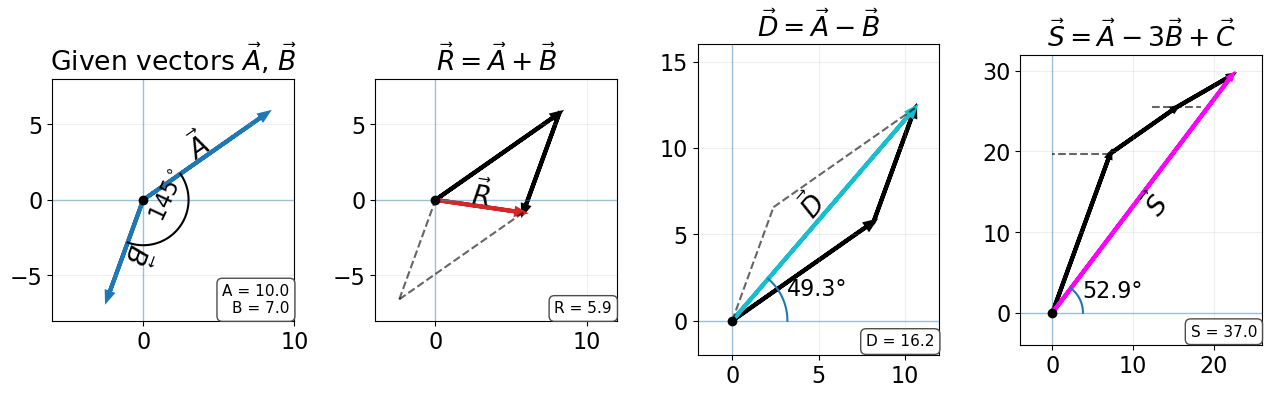
The three displacement vectors \(\vec{A}\), \(\vec{B}\), and \(\vec{C}\) lie in the horizontal plane.
Their magnitudes are \(A = 10.0\ \text{cm}\), \(B = 7.0\ \text{cm}\), and \(C = 8.0\ \text{cm}\), respectively,
and their direction angles (measured counterclockwise from the positive \(x\)-axis) are
\(\alpha = 35^\circ\), \(\beta = -110^\circ\), and \(\gamma = 30^\circ\).Choose a convenient scale and use a ruler and a protractor to find the following vector sums:
(a) \(\vec{R} = \vec{A} + \vec{B}\)
(b) \(\vec{D} = \vec{A} - \vec{B}\)
(c) \(\vec{S} = \vec{A} - 3\vec{B} + \vec{C}\)
Fig. 2.9 Image Credit: OpenStax: Scalars and Vectors.#
The Model
We model each displacement as a two-dimensional vector in the horizontal plane. Each vector has a magnitude and a direction angle measured relative to the positive \(x\)-axis.
Because this is a geometric construction, the vectors are drawn to scale and placed either tail-to-head or tail-to-tail depending on the combination being represented. Vector subtraction is modeled by reversing the direction of the vector being subtracted while keeping its magnitude unchanged. The resultant is the single vector that represents the combined effect of the vectors in the diagram.
The Math
For a geometric construction, the magnitude and direction of each resultant are obtained by drawing the vectors to scale and then measuring the resultant vector. The direction angles are measured counterclockwise from the positive \(x\)-axis.
(a) For the sum \(\vec{R} = \vec{A} + \vec{B}\), the vectors are drawn tail-to-head so that the tail of \(\vec{B}\) is placed at the head of \(\vec{A}\). The resultant vector \(\vec{R}\) is drawn from the tail of \(\vec{A}\) to the head of \(\vec{B}\). Measuring the scaled diagram gives
(b) For the difference \(\vec{D} = \vec{A} - \vec{B}\), the subtraction is treated as addition of the opposite vector. The vector \(-\vec{B}\) has the same magnitude as \(\vec{B}\) but points in the opposite direction, so the construction uses
Measuring the scaled diagram gives
(c) For the linear combination \(\vec{S} = \vec{A} - 3\vec{B} + \vec{C}\), the vector \(\vec{B}\) is first scaled by a factor of \(3\) and reversed to represent \(-3\vec{B}\). The vectors are then drawn tail-to-head, and \(\vec{S}\) is drawn from the tail of the first vector to the head of the final vector. Measuring the scaled diagram gives
The Conclusion
The geometric construction gives the resultant values
and
These results show that the same vector operations can be represented geometrically by drawing vectors to scale, but the accuracy of the result depends on the precision of the construction.
The Verification
The Python verification converts the given vectors into Cartesian components and evaluates the same vector combinations used in the geometric construction. The computed magnitudes and direction angles provide a numerical check on the measured graphical results.
Show code cell source
import numpy as np
import matplotlib.pyplot as plt

# -----------------------
# Vector setup
# -----------------------
A_mag, B_mag, C_mag = 10.0, 7.0, 8.0
alpha_deg, phi_deg, gamma_deg = 35.0, 145.0, 30.0

A = A_mag * np.array([np.cos(np.deg2rad(alpha_deg)),
                      np.sin(np.deg2rad(alpha_deg))])
B = B_mag * np.array([np.cos(np.deg2rad(alpha_deg - phi_deg)),
                      np.sin(np.deg2rad(alpha_deg - phi_deg))])
C = C_mag * np.array([np.cos(np.deg2rad(gamma_deg)),
                      np.sin(np.deg2rad(gamma_deg))])

R = A + B
D = A - B
S = A - 3*B + C

def direction_angle(v):
    angle = np.degrees(np.arctan2(v[1], v[0]))
    return angle if angle >= 0 else angle + 360

print(f"The computed vector R has magnitude {np.linalg.norm(R):.1f} cm and direction {direction_angle(R):.1f} degrees.")
print(f"The computed vector D has magnitude {np.linalg.norm(D):.1f} cm and direction {direction_angle(D):.1f} degrees.")
print(f"The computed vector S has magnitude {np.linalg.norm(S):.1f} cm and direction {direction_angle(S):.1f} degrees.")

# -----------------------
# Helpers
# -----------------------
def draw_arrow(ax, origin, v, **kw):
    ax.arrow(*origin, *v, length_includes_head=True, head_width=0.35, head_length=0.45, linewidth=3, **kw)

def info_box(ax, lines, loc="lower right"):
    locs = {
        "upper left":  (0.02, 0.98, "left",  "top"),
        "upper right": (0.98, 0.98, "right", "top"),
        "lower left":  (0.02, 0.02, "left",  "bottom"),
        "lower right": (0.98, 0.02, "right", "bottom"),
    }
    x, y, ha, va = locs[loc]
    ax.text(x, y, "\n".join(lines), transform=ax.transAxes, ha=ha, va=va, fontsize=11,
            bbox=dict(boxstyle="round,pad=0.35", facecolor="white", edgecolor="0.3"))

def setup_axes(ax):
    ax.set_aspect("equal", adjustable="box")
    ax.axhline(0, lw=1, alpha=0.4)
    ax.axvline(0, lw=1, alpha=0.4)
    ax.grid(True, alpha=0.2)
    ax.plot(0, 0, "ko", ms=6)

def label_vector(ax, x0, y0, dx, dy, text, color, fontsize, offset=0.10, center=False):
    xm, ym = x0 + dx/2, y0 + dy/2
    nx, ny = -dy, dx
    n = (nx**2 + ny**2)**0.5
    nx, ny = nx/n, ny/n
    angle = np.degrees(np.arctan2(dy, dx))
    if center:
        ax.text(xm + offset*nx, ym + offset*ny,text, color=color, fontsize=fontsize,rotation=angle, ha='center', va='center')
    else:
        ax.text(xm + offset*nx, ym + offset*ny, text, color=color, fontsize=fontsize, rotation=angle)
    return

# -----------------------
# Panel draw functions
# -----------------------
def panel_given(ax):
    draw_arrow(ax, (0,0), A, color="tab:blue")
    draw_arrow(ax, (0,0), B, color="tab:blue")

    label_vector(ax,0,0,A[0],A[1], r"$\vec A$",'k',fs,0.8,True)
    label_vector(ax,0,0,B[0],B[1], r"$\vec B$",'k',fs,0.8,True)

    # included angle
    t = np.linspace(np.deg2rad(alpha_deg), np.deg2rad(alpha_deg - phi_deg), 80)
    r = 3
    ax.plot(r*np.cos(t), r*np.sin(t),'k')
    ax.text(0.7*r*np.cos(t[len(t)//2]), 0.7*r*np.sin(t[len(t)//2]), "$145^\circ$",rotation=65,horizontalalignment='center')

    info_box(ax, ["A = 10.0", "B = 7.0"])
    ax.set_xlim(-6, 10)
    ax.set_ylim(-8, 8)

def panel_sum(ax):
    draw_arrow(ax, (0,0), A, color="k")
    draw_arrow(ax, A, B, color="k")
    draw_arrow(ax, (0,0), R, color="tab:red")

    ax.plot([B[0], R[0]], [B[1], R[1]], "k--", alpha=0.6)
    ax.plot([B[0], 0], [B[1], 0], "k--", alpha=0.6)

    label_vector(ax,0,0,R[0],R[1], r"$\vec R$",'k',fs,0.8,True)
    info_box(ax, [f"R = {np.linalg.norm(R):.1f}"])
    ax.set_xlim(-4, 12)
    ax.set_ylim(-8, 8)

def panel_diff(ax):
    draw_arrow(ax, (0,0), A, color="k")
    draw_arrow(ax, A, -B, color="k")
    draw_arrow(ax, (0,0), D, color="tab:cyan")

    ax.plot([-B[0], D[0]], [-B[1], D[1]], "k--", alpha=0.6)
    ax.plot([0, -B[0]], [0, -B[1]], "k--", alpha=0.6)

    theta = np.arctan2(D[1], D[0])
    t = np.linspace(0, theta, 80)
    r = 3.2
    ax.plot(r*np.cos(t), r*np.sin(t))
    ax.text(1.1*r*np.cos(theta/2), 1.1*r*np.sin(theta/2), f"{np.degrees(theta):.1f}°")

    label_vector(ax,0,0,D[0],D[1], r"$\vec D$",'k',fs,0.8,True)
    info_box(ax, [f"D = {np.linalg.norm(D):.1f}"])
    ax.set_xlim(-2, 12)
    ax.set_ylim(-2, 16)

def panel_S(ax):
    # Head-to-tail: -3B then A then C
    draw_arrow(ax, (0,0), -3*B, color="k")
    draw_arrow(ax, -3*B, A, color="k")
    draw_arrow(ax, -3*B + A, C, color="k")

    # Resultant S = A - 3B + C
    draw_arrow(ax, (0,0), S, color="magenta")

    # Construction guides (optional, light)
    ax.plot([-3*B[0], 0], [-3*B[1], -3*B[1]], "k--", alpha=0.6)
    ax.plot([0.8*(-3*B + A)[0],1.2*(-3*B + A)[0]], [(-3*B + A)[1], (-3*B + A)[1]], "k--", alpha=0.6)
    # Angle marker for S
    theta = np.arctan2(S[1], S[0])
    t = np.linspace(0, theta, 80)
    r = 3.8
    ax.plot(r*np.cos(t), r*np.sin(t))
    ax.text(1.1*r*np.cos(theta/2), 1.1*r*np.sin(theta/2), f"{np.degrees(theta):.1f}°")
    # Optional vector symbol labels (kept minimal)
    label_vector(ax,0,0,S[0],S[1], r"$\vec S$",'k',fs,-2.2,True)
    # Boxed magnitude label
    info_box(ax, [f"S = {np.linalg.norm(S):.1f}"])
    ax.set_xlim(-4, 26)
    ax.set_ylim(-4, 32)

# -----------------------
# Loop over panels
# -----------------------
fs = 'large'
fig, axes = plt.subplots(1, 4, figsize=(13, 4))

panels = [("Given vectors "+r"$\vec{A}$, $\vec{B}$", panel_given),
    (r"$\vec R=\vec A+\vec B$", panel_sum),
    (r"$\vec D=\vec A-\vec B$", panel_diff),
    (r"$\vec S=\vec A-3\vec B+\vec C$", panel_S),]

for ax, (title, draw_fn) in zip(axes, panels):
    setup_axes(ax)
    ax.set_title(title)
    draw_fn(ax)

plt.tight_layout()
plt.show()
The computed vector R has magnitude 5.9 cm and direction 351.7 degrees.
The computed vector D has magnitude 16.2 cm and direction 49.3 degrees.
The computed vector S has magnitude 37.0 cm and direction 52.9 degrees.
2.2. Coordinate Systems and Vector Components#
``{raw} html
The graphic method of vector addition can be time-consuming, where we can instead describe a vector in terms of its components within a coordinate system. In a rectangular (Cartesian) \(xy\)-coordinate system in a plane, a point is described by a pair of coordinates \((x,\ y)\) that “locate” the point. Note we used this on the chessboard using letters and numbers for each cell.
2.2.1. Vector components#
A vector \(\vec{A}\) can be decomposed into its vector components, where each component is itself a vector. These vector components are constructed using the unit vectors \(\hat{i}\) and \(\hat{j}\) that mark a unit step in either the \(x\) or \(y\)-axis, respectively. Therefore, the vector \(\vec{A}\) can be represented as
where the \(A_x\) and \(A_y\) represent the magnitude of the step along the respective Cartesian axis. Recall the chessboard where the start of the vector can be anywhere on the board. This means that the component magnitudes are measurements relative to where you start.
Let’s define the starting location of vector \(\vec{A}\) as a point \((x_o,\ y_o)\), and the vector terminates at a point \((x,\ y)\). Then, we can describe the vector as
Checkpoint
A pointer moves from \((6.0,\ 1.6)\ {\rm cm}\) to \((2.0,\ 4.5)\ {\rm cm}\).
Which point should be subtracted first: final or initial?
Note
When referring to \(x_o\), it is read as “x-naught”. The word naught is more commonly used in British English referring to the number zero so that one can delineate between the number zero and the letter o.
2.2.1.1. Example Problem: Mouse pointer displacement#
Exercise 2.3
The Problem
A mouse pointer on the display monitor of a computer at its initial position is at point \((6.0\ \text{cm},\,1.6\ \text{cm})\) with respect to the lower left-side corner. If you move the pointer to an icon located at point \((2.0\ \text{cm},\,4.5\ \text{cm})\), what is the displacement vector of the pointer?
The Model
We model the screen as a two-dimensional Cartesian coordinate system with the origin at the lower left corner of the monitor. The positive \(x\)-direction points to the right, and the positive \(y\)-direction points upward.
The displacement vector \(\vec{D}\) is defined as the vector pointing from the initial position of the pointer to its final position. Its components are obtained by subtracting the initial coordinates from the final coordinates.
The Math
Let the initial and final points point be
The components of the displacement vector are
Therefore, the displacement vector in unit-vector form is
The Conclusion
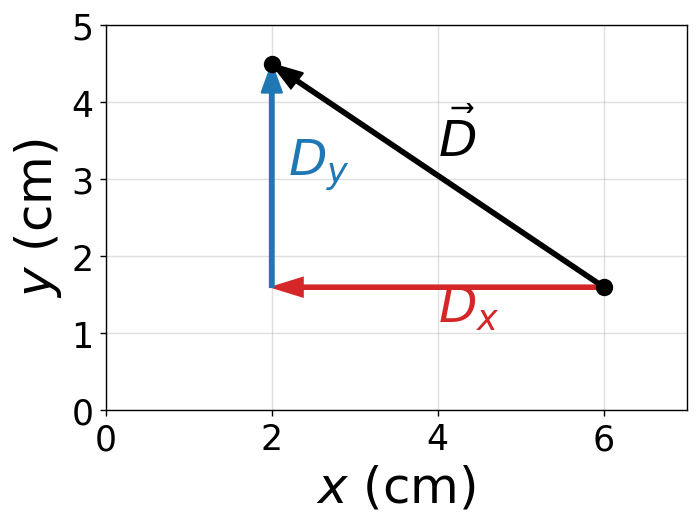
The mouse pointer’s displacement vector is \(\vec{D} = (-4.0\hat{i} + 2.9\hat{j})\ \text{cm}.\) This means the pointer moves \(4.0\ \text{cm}\) to the left and \(2.9\ \text{cm}\) upward from its initial position.
The Verification
The Python verification computes the displacement components by subtracting the initial coordinates from the final coordinates. The plot shows the horizontal and vertical components together with the resultant displacement vector.
import matplotlib.pyplot as plt
import numpy as np

fs = 'x-large'

# Initial and final positions (cm)
xi, yi = 6.0, 1.6
xf, yf = 2.0, 4.5

# Displacement components
Dx = xf - xi
Dy = yf - yi

fig = plt.figure(figsize=(6, 4),dpi=125)
ax = fig.add_subplot(111)
ax.grid(True, zorder=2, alpha=0.4)

# x-component
ax.arrow(xi, yi, Dx, 0, color='tab:red', width=0.05, length_includes_head=True, head_width=0.25, zorder=4)
ax.text(xi + Dx/2, yi - 0.4, r'$D_x$', fontsize=fs, color='tab:red')

# y-component
ax.arrow(xi + Dx, yi, 0, Dy, color='tab:blue', width=0.05, length_includes_head=True, head_width=0.25, zorder=4)
ax.text(xi + Dx + 0.2, yi + Dy/2, r'$D_y$', fontsize=fs, color='tab:blue')

# resultant displacement
ax.arrow(xi, yi, Dx, Dy, color='k', width=0.05, length_includes_head=True, head_width=0.25, zorder=5)
ax.text(xi + Dx/2, yi + Dy/2 + 0.2, r'$\vec{D}$', fontsize=fs)

# points
ax.plot(xi, yi, 'ko', ms=8)
ax.plot(xf, yf, 'ko', ms=8)

ax.set_xlim(0, 7)
ax.set_ylim(0, 5)
ax.set_xlabel('$x$ (cm)', fontsize=fs)
ax.set_ylabel('$y$ (cm)', fontsize=fs)
ax.minorticks_on()

plt.show()

print(f"The displacement vector is D = ({Dx:.1f} î + {Dy:.1f} ĵ) cm.")
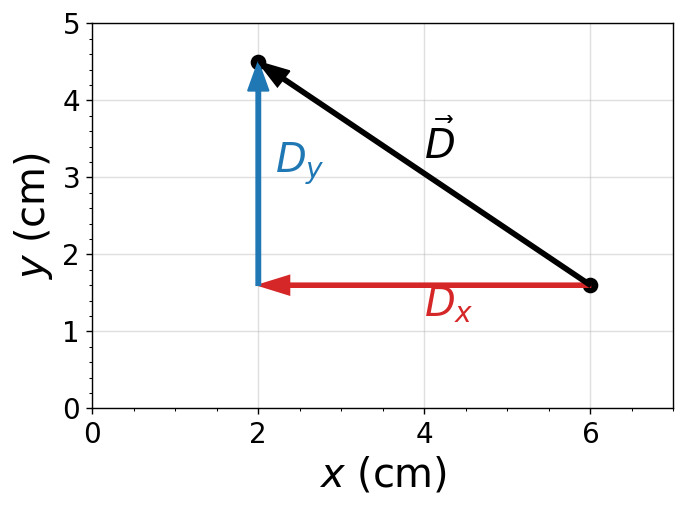
The displacement vector is D = (-4.0 î + 2.9 ĵ) cm.
2.2.2. Determining vector magnitude and direction#
The vector magnitude in 2D is also described as the Euclidean distance and occasionally called the Pythagorean distance. The distance along the vector \(\vec{A}\) is determined by summing the squares along the components to get \(A^2\) and taking the square root to get the magnitude \(A\).
The square root permits positive and negative results, where we take the absolute magnitude. The direction will be resolve by the direction angle \(\theta_A\).
Fig. 2.10 Decomposing a vector \(A\) into its \(x\)- and \(y\)-components. Image Credit: OpenStax: Coordinate Systems.#
From the Euclidean distance formula (or Pythagorean theorem), we have
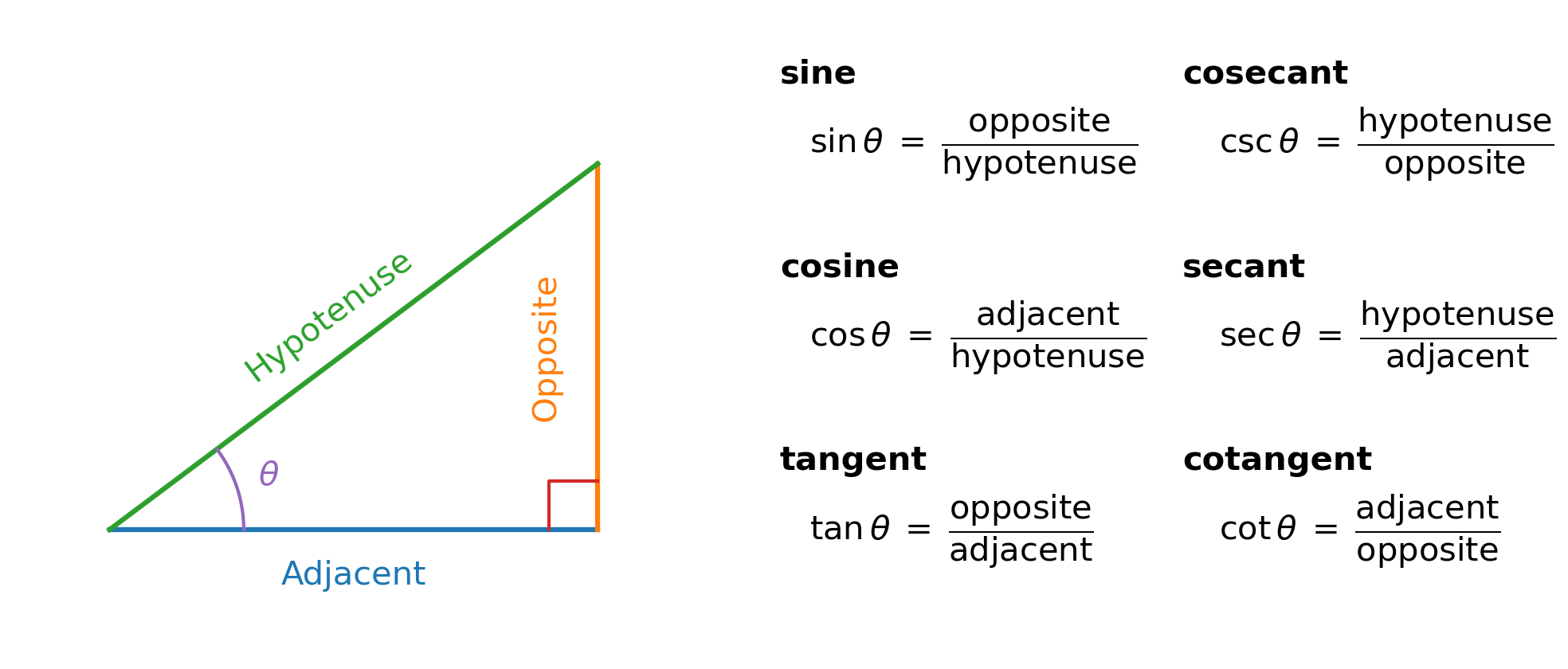
This equation works even when the components (\(A_x,\ A_y\)) are negative. The direction angle of a vector is determined using a trigonometric function. See the triangle below and the summary of the trig functions. Various mnemonics are used to help remember these relations (e.g., SOH-CAH-TOA).
Show code cell source
import numpy as np
import matplotlib.pyplot as plt
from matplotlib import rcParams

rcParams.update({'font.size': 20})

fig = plt.figure(figsize=(14,6), dpi=150)
axL = fig.add_subplot(121)
axR = fig.add_subplot(122)

# -------------------------
# LEFT: Right triangle
# -------------------------
A = np.array([0.0, 0.0])
B = np.array([4.0, 0.0])
C = np.array([4.0, 3.0])

c_adj = '#1f77b4'   # blue
c_opp = '#ff7f0e'   # orange
c_hyp = '#2ca02c'   # green
c_theta = '#9467bd' # purple
c_right = '#d62728' # red

axL.plot([A[0], B[0]], [A[1], B[1]], lw=3, color=c_adj)
axL.plot([B[0], C[0]], [B[1], C[1]], lw=3, color=c_opp)
axL.plot([A[0], C[0]], [A[1], C[1]], lw=3, color=c_hyp)

s = 0.4
axL.plot([B[0]-s, B[0]-s, B[0]], [B[1], B[1]+s, B[1]+s], lw=2, color=c_right)

def unit(v):
    n = (v[0]**2 + v[1]**2)**0.5
    return v/n

def label_side(ax, P, Q, text, color, offset=0.30, rotate=True):
    mid = 0.5*(P+Q)
    v = Q-P
    u = unit(v)
    n = np.array([-u[1], u[0]])
    ang = np.degrees(np.arctan2(v[1], v[0]))
    ax.text(mid[0]+offset*n[0], mid[1]+offset*n[1], text,
            color=color, rotation=ang if rotate else 0,
            ha='center', va='center')

# Tighten Adjacent/Opposite offsets
label_side(axL, A, B, "Adjacent", c_adj, offset=-0.38, rotate=False)
label_side(axL, B, C, "Opposite", c_opp, offset=0.42, rotate=True)
label_side(axL, A, C, "Hypotenuse", c_hyp, offset=0.32, rotate=True)

# Theta arc at A: more room
theta = np.arctan2(C[1]-A[1], C[0]-A[0])
r = 1.10
t = np.linspace(0, theta, 140)
axL.plot(A[0] + r*np.cos(t), A[1] + r*np.sin(t), lw=2, color=c_theta)
axL.text(A[0] + 1.25*r*np.cos(theta/2),
         A[1] + 1.25*r*np.sin(theta/2),
         r'$\theta$', color=c_theta, ha='center', va='center')

axL.set_aspect('equal')
axL.set_xlim(-0.8, 5.2)
axL.set_ylim(-1.0, 4.2)
axL.set_xticks([])
axL.set_yticks([])
for spine in axL.spines.values():
    spine.set_visible(False)

# -------------------------
# RIGHT: Trig definitions (aligned grid)
# -------------------------
axR.axis('off')

# Column anchors
x_name_L = 0.0
x_eq_L   = 0.04
x_name_R = 0.55
x_eq_R   = 0.6

# Row anchors
y1, y2, y3 = 0.78, 0.48, 0.18
dy_title = 0.11

# Left column
axR.text(x_name_L, y1+dy_title, "sine", fontweight='bold', transform=axR.transAxes, ha='left')
axR.text(x_eq_L,   y1, r'$\sin\theta \;=\; \dfrac{\mathrm{opposite}}{\mathrm{hypotenuse}}$',
         transform=axR.transAxes, ha='left')

axR.text(x_name_L, y2+dy_title, "cosine", fontweight='bold', transform=axR.transAxes, ha='left')
axR.text(x_eq_L,   y2, r'$\cos\theta \;=\; \dfrac{\mathrm{adjacent}}{\mathrm{hypotenuse}}$',
         transform=axR.transAxes, ha='left')

axR.text(x_name_L, y3+dy_title, "tangent", fontweight='bold', transform=axR.transAxes, ha='left')
axR.text(x_eq_L,   y3, r'$\tan\theta \;=\; \dfrac{\mathrm{opposite}}{\mathrm{adjacent}}$',
         transform=axR.transAxes, ha='left')

# Right column
axR.text(x_name_R, y1+dy_title, "cosecant", fontweight='bold', transform=axR.transAxes, ha='left')
axR.text(x_eq_R,   y1, r'$\csc\theta \;=\; \dfrac{\mathrm{hypotenuse}}{\mathrm{opposite}}$',
         transform=axR.transAxes, ha='left')

axR.text(x_name_R, y2+dy_title, "secant", fontweight='bold', transform=axR.transAxes, ha='left')
axR.text(x_eq_R,   y2, r'$\sec\theta \;=\; \dfrac{\mathrm{hypotenuse}}{\mathrm{adjacent}}$',
         transform=axR.transAxes, ha='left')

axR.text(x_name_R, y3+dy_title, "cotangent", fontweight='bold', transform=axR.transAxes, ha='left')
axR.text(x_eq_R,   y3, r'$\cot\theta \;=\; \dfrac{\mathrm{adjacent}}{\mathrm{opposite}}$',
         transform=axR.transAxes, ha='left')

plt.tight_layout()
plt.show()
Since we have the lengths of both the adjacent (\(A_x\)) and opposite (\(A_y\)) sides of the triangle, it is easiest to use the \(\tan{\theta}\) function, which results in
If \(\vec{A}\) lies in quadrants I or IV, the angle \(\theta = \theta_A\), but it is measured in the
counterclockwise direction in quadrant I,
clockwise direction (negative) in quadrant IV
relative to the \(x\)-axis.
To find \(\theta_A\) in quadrants II or III, one must use the relation \(\theta_A = 180^\circ + \theta\) because \(\theta<0\) due to \(A_y/A_x < 0\).
Fig. 2.11 Scalar components of a vector may be positive or negative. Vectors in the first quadrant (I) have both scalar components positive and vectors in the third quadrant have both scalar components negative. For vectors in quadrants II and III, the direction angle of a vector is \(\theta_A = \theta + 180^\circ.\) Image Credit: OpenStax: Coordinate Systems.#
Checkpoint
A vector has components \(D_x < 0\) and \(D_y > 0\).
Which quadrant does the vector point into?
2.2.2.1. Example Problem: Mouse pointer magnitude and direction#
Exercise 2.4
The Problem
You move a mouse pointer on the display monitor from its initial position at point \((6.0\ \text{cm},\, 1.6\ \text{cm})\) to an icon located at point \((2.0\ \text{cm},\, 4.5\ \text{cm})\). What are the magnitude and direction of the displacement vector of the pointer?
The Model
The Model
We model the computer screen as a two-dimensional Cartesian coordinate system with the origin at the lower-left corner of the monitor. The positive \(x\)-direction points to the right, and the positive \(y\)-direction points upward.
The displacement vector points from the pointer’s initial position to its final position. Once that displacement is expressed in rectangular components, its magnitude is found from the component lengths, and its direction is determined by the orientation of the vector in the coordinate plane.
The Math
The displacement vector \(\vec{D}\) points from the initial position to the final position. Its components are found by subtraction:
The initial and final positions of the mouse pointer are represented by the coordinate pairs
The displacement components are found by subtracting the initial coordinates from the final coordinates along each axis.
The magnitude of the displacement is determined from the Pythagorean relationship between the rectangular components.
The direction angle is first found from the ratio of the vertical component to the horizontal component.
Because \(D_x < 0\) and \(D_y > 0\), the displacement vector lies in Quadrant II. The direction angle measured counterclockwise from the positive \(x\)-axis is therefore
Common Mistake
A very common mistake when finding the direction of a displacement vector is to compute
and stop there.
This inverse tangent only returns angles between \(-90^\circ\) and \(+90^\circ\). It does not know which quadrant the vector lies in.
What can go wrong
If \(D_x < 0\), the vector is in Quadrant II or III.
If \(D_y < 0\), the vector is in Quadrant III or IV.
The raw \(\tan^{-1}\) value must often be adjusted by \(180^\circ\).
In this problem:
so the displacement vector lies in Quadrant II, not Quadrant IV. Failing to account for this would give the wrong direction angle.
Best practice
Always check the signs of \(D_x\) and \(D_y\).
Or, when using Python, use
np.arctan2(Dy, Dx), which automatically returns the correct quadrant.
The Conclusion
The displacement vector has magnitude \(D = 4.9\ \text{cm}\) and direction \(\theta_D = 144.1^\circ\) (counterclockwise from the positive \(x\)-axis). It points into Quadrant II, consistent with \(D_x=-4.0\ \text{cm}\) and \(D_y=+2.9\ \text{cm}\).
The Verification
The Python verification computes the displacement components, then uses those components to calculate the magnitude and the quadrant-correct direction angle. The plot shows the same displacement vector and its rectangular components.
import matplotlib.pyplot as plt
import numpy as np

fs = 'x-large'

# Given points (cm)
xi, yi = 6.0, 1.6
xf, yf = 2.0, 4.5

# Components
Dx, Dy = xf - xi, yf - yi

# Magnitude and direction (CCW from +x)
D = np.hypot(Dx, Dy)
theta = np.degrees(np.arctan2(Dy, Dx))  # already quadrant-correct

fig = plt.figure(figsize=(6, 4), dpi=125)
ax = fig.add_subplot(111)
ax.grid(True, zorder=2, alpha=0.4)

# Component arrows (single-line arrow calls)
ax.arrow(xi, yi, Dx, 0, color='tab:red',  ls='-', width=0.05, length_includes_head=True, head_width=0.25, zorder=4)
ax.arrow(xi + Dx, yi, 0, Dy, color='tab:blue', ls='-', width=0.05, length_includes_head=True, head_width=0.25, zorder=4)
# Resultant displacement arrow
ax.arrow(xi, yi, Dx, Dy, color='k', ls='-', width=0.05, length_includes_head=True, head_width=0.25, zorder=5)
# Points
ax.plot(xi, yi, 'k.', ms=18, zorder=6)
ax.plot(xf, yf, 'k.', ms=18, zorder=6)

# Labels
ax.text(xi + Dx/2, yi - 0.45, r'$D_x$', fontsize=fs, color='tab:red')
ax.text(xi + Dx + 0.20, yi + Dy/2, r'$D_y$', fontsize=fs, color='tab:blue')
ax.text(xi + Dx/2, yi + Dy/2 + 0.25, r'$\vec{D}$', fontsize=fs, color='k')

ax.set_xlim(0, 7)
ax.set_ylim(0, 5)
ax.set_xlabel('$x$ (cm)', fontsize=fs)
ax.set_ylabel('$y$ (cm)', fontsize=fs)

plt.show()

print(f"The displacement has magnitude D = {D:.1f} cm and direction θ = {theta:.1f}° (CCW from +x).")
The displacement has magnitude D = 4.9 cm and direction θ = 144.1° (CCW from +x).
2.2.3. Polar coordinates#
To locate a point on a plane, we need two orthogonal directions. In the Cartesian coordinate system, we used the unit vectors \(\hat{i}\) and \(\hat{j}\). When considering rotating objects, it can be easier working in the polar coordinate system.
The location of a point is instead defined by the radial coordinate \(r\) (i.e., distance from the origin) and angular coordinate \(\varphi\) (sometimes called the azimuthal coordinate) which measures the rotation angle with some chosen direction, usually the positive \(x\)-direction. The angular coordinate is often measured in radians.
The unit vectors for polar coordinates are given as \(\hat{r}\) (radial) and \(\hat{t}\) (transverse). The \(\hat{r}\) describes points outward in radius relative to the center. The positive \(\hat{t}\) direction indicates how the angle \(\varphi\) changes in the counterclockwise direction.
We can connect a the Cartesian point to a polar equivalent via a transformation:
See the figure below, which shows the relationship between Cartesian and polar coordinates.
Fig. 2.12 Using polar coordinates, the unit vector \(\hat{r}\) defines the positive direction along the radius \(r\) (radial direction) and, orthogonal to it, the unit vector \(\hat{t}\) defines the positive direction of rotation by the angle \(\varphi\). Image Credit: OpenStax: Coordinate Systems.#
Checkpoint
A vector points \(20^\circ\) north of west.
What is its standard angle measured counterclockwise from the positive \(x\)-axis?
Direction phrase |
Standard angle from \(+x\) |
Quadrant |
|---|---|---|
\(\theta\) north of east |
\(\theta\) |
I |
\(\theta\) south of east |
\(-\theta\) or \(360^\circ-\theta\) |
IV |
\(\theta\) north of west |
\(180^\circ-\theta\) |
II |
\(\theta\) south of west |
\(180^\circ+\theta\) |
III |
\(\theta\) east of north |
\(90^\circ-\theta\) |
I |
\(\theta\) west of north |
\(90^\circ+\theta\) |
II |
2.2.3.1. Example Problem: Coins near a well#
Exercise 2.5
The Problem
A treasure hunter finds one silver coin at a location \(20.0\) m away from a dry well in the direction \(20^\circ\) north of east and finds one gold coin at a location \(10.0\) m away from the well in the direction \(20^\circ\) north of west. What are the polar and rectangular coordinates of these findings with respect to the well?
The Model
We model the dry well as the origin of a two-dimensional coordinate system. The positive \(x\)-axis points east, and the positive \(y\)-axis points north.
Each coin’s position is naturally described using polar coordinates because the distance from the well and the direction from the well are given directly. To locate each coin on a Cartesian grid, the polar description is converted into horizontal and vertical components. Angles are measured counterclockwise from the positive \(x\)-axis.
The Math
Each coin is naturally described in polar form because its distance from the well and its direction are given directly. To compare the locations using standard vector components, we convert these polar descriptions into rectangular coordinates using the relations
All angles are measured counterclockwise from the positive \(x\)-axis.
For the silver coin, the given description places it \(20.0\) m from the well at an angle of \(20^\circ\) north of east. In polar form, this corresponds to
Substituting these values into the coordinate relations gives
The gold coin is located \(20^\circ\) north of west. Because west corresponds to \(180^\circ\) measured from the positive \(x\)-axis, the direction angle for this coin is
Using the same coordinate relations,
The Conclusion
The silver coin is located at \((x_S, y_S) = (18.9\ \text{m},\ 6.8\ \text{m}),\) placing it east and north of the well. The gold coin is located at \((x_G, y_G) = (-9.4\ \text{m},\ 3.4\ \text{m}),\) which places it west and north of the well.
The signs of the \(x\)-components correctly encode the physical directions: positive for eastward displacement and negative for westward displacement, while both coins have positive \(y\)-components because they lie north of the well.
The Verification
The Python verification evaluates the same polar-to-rectangular coordinate conversion used in the analytical solution. The output reports each coin’s coordinates as complete sentences with the same rounding used above.
import numpy as np

# Angles in radians
theta_s = np.pi/9
theta_g = 8*np.pi/9

# Radii
r_s = 20.0
r_g = 10.0

# Cartesian coordinates
x_s, y_s = r_s*np.cos(theta_s), r_s*np.sin(theta_s)
x_g, y_g = r_g*np.cos(theta_g), r_g*np.sin(theta_g)

print(f"The silver coin is located at ({x_s:.1f}, {y_s:.1f}) m relative to the well.")
print(f"The gold coin is located at ({x_g:.1f}, {y_g:.1f}) m relative to the well.")
The silver coin is located at (18.8, 6.8) m relative to the well.
The gold coin is located at (-9.4, 3.4) m relative to the well.
2.2.4. Vectors in 3D#
To specify a location in space (in general), we need three coordinates (\(x,\ y,\ z\)), where two coordinates (\(x,\ y\)) can identify points in a plane, and the \(z\)-coordinate locates points that extend above or below the plane. The advent of an extra coordinate necessitates the inclusion of a third unit vector \(\hat{k}\).
The order of the coordinates \(x-y-z\) and the unit vectors \(\hat{i}-\hat{j}-\hat{k}\) defines the standard right-handed coordinate system. In this coordinate system, “up” is now defined using the \(+\hat{z}\) direction and aligns with your right thumb. That means the positive azimuthal (polar) angle uses the \(x\)-axis as a reference direction and rotates counterclockwise (from \(\hat{i}\) to \(\hat{j}\)), which follows the curve of your fingers as you curl them. The figure below illustrates the unit vectors and how they map to the edges of a cube in 3D space.
Fig. 2.13 Three unit vectors define a Cartesian system in three-dimensional space. The order in which these unit vectors appear defines the orientation of the coordinate system. The order shown here defines the right-handed orientation. Figure Credit: OpenStax: Coordinate Systems.#
The 3D version of the vector \(\vec{A}\) has three components, which can be represented by the sum of the components by
The magnitude \(A\) is now defined by generalizing the distance equation to
The figure below illustrates the vector components and how they map to the edges of a cube in 3D space.
Fig. 2.14 A vector in three-dimensional space is the vector sum of its three vector components. Figure Credit: OpenStax: Coordinate Systems.#
Checkpoint
A drone moves east, north, and upward.
Which components correspond to \(\hat{i}\), \(\hat{j}\), and \(\hat{k}\)?
2.2.4.1. Example Problem: Takeoff of a drone#
Exercise 2.6
The Problem
During a takeoff of an IAI Heron drone, its position with respect to a control tower is \(100\) m above the ground, \(300\) m to the east, and \(200\) m to the north. One minute later, its position is \(250\) m above the ground, \(1200\) m to the east, and \(2100\) m to the north. What is the drone’s displacement vector with respect to the control tower? What is the magnitude of this displacement vector?
Show worked solution
The Model
We model the drone’s motion using a three-dimensional Cartesian coordinate system with the control tower as the origin. The positive \(x\)-direction points east, the positive \(y\)-direction points north, and the positive \(z\)-direction points upward.
The drone’s displacement vector points from its initial position to its final position. Each component of the displacement describes the change in position along one coordinate axis, and the magnitude of the displacement represents the straight-line distance between the initial and final positions.
The Math
The drone’s displacement vector is defined as the final position vector minus the initial position vector.
At takeoff, the drone is located at the point \((x_i, y_i, z_i) = (300,\ 200,\ 100)\ \text{m}\) relative to the control tower. One minute later, its position is \((x_f, y_f, z_f) = (1200,\ 2100,\ 250)\ \text{m}\).
The components of the displacement vector are obtained by subtracting the initial coordinates from the final coordinates along each axis.
With these components identified, the displacement vector can be written in unit-vector form.
Expressing each component in kilometers gives
The magnitude of the displacement is determined from the three-dimensional magnitude formula.
The Conclusion
The drone’s displacement vector is \( \vec{D} = (0.90\hat{i} + 1.90\hat{j} + 0.15\hat{k})\ \text{km},\) with a magnitude of 2.11 km. This result reflects a dominant horizontal displacement toward the northeast with a smaller vertical climb.
The Verification
The Python verification stores the initial and final positions as arrays and subtracts them in the same order used in the analytical solution. The code then computes the magnitude of the displacement vector and reports both the vector and its length in complete sentences.
```python
import numpy as np

r_i = np.array([300, 200, 100])
r_f = np.array([1200, 2100, 250])

D = r_f - r_i
D_mag = np.linalg.norm(D)/1000

print(f"The computed displacement vector is ({D[0]:.0f} i-hat + {D[1]:.0f} j-hat + {D[2]:.0f} k-hat) m.")
print(f"The computed magnitude of the displacement is {D_mag:.2f} km.")
2.3. Algebra of Vectors#
This narration is AI-generated from the course text.
We’ve seen some properties of vectors from Section 2.1.5 Properties of Vectors, where there a few other properties not yet mentioned. A vector can be
reversed (i.e., multiplied by a scalar, \(-1\)),
nullified,
made equal.
To reverse the direction of a vector, we follow the rules for scaling a vector:
The number zero can be generalized to vector algebra through the object called the null vector, denoted by \(\vec{0}\). It represents a vector that has no length or direction,
If the difference of two vectors (\(\vec{A}\) and \(\vec{B}\)) is set to the null vector, we have
By matching components, we can see that
When \(\vec{A}-\vec{B} = \vec{0}\), this implies that \(\vec{A} = \vec{B}\) because all their corresponding components are equal.
Situation |
Best method |
Why |
|---|---|---|
Vectors are drawn to scale |
Geometric construction |
The diagram gives magnitude and direction visually. |
Vectors are given by magnitude and angle |
Resolve into components |
Components make addition and subtraction reliable. |
Vectors are given as \(x\), \(y\), and \(z\) components |
Component algebra |
Matching components can be combined directly. |
You need the angle between two vectors |
Dot product |
The dot product contains \(\cos\theta\). |
You need a perpendicular vector or rotational direction |
Cross product |
The cross product gives a vector normal to the plane. |
2.3.1. Example Problem: Military convoy direction#
Exercise 2.7
The Problem
A military convoy advances through unknown territory. In a Cartesian coordinate system, the unit vector \(\hat{i}\) denotes geographic east, \(\hat{j}\) denotes geographic north, and \(\hat{k}\) denotes altitude above sea level. The convoy’s velocity is given by
\[ \vec{v} = (4.0\hat{i} + 3.0\hat{j} + 0.1\hat{k}) \ \text{km/h}.\]If the convoy were forced to retreat, in what geographic direction would it be moving? Describe both its horizontal direction and its vertical motion.
The Model
We model the convoy’s motion using a 3-dimensional velocity vector expressed in Cartesian components. The horizontal motion occurs in the east–north plane, while the vertical motion is represented by the \(\hat{k}\) component.
A retreat corresponds to reversing the direction of motion. Therefore, the retreat velocity vector must be antiparallel to the original velocity vector. This means the new velocity vector points in the opposite direction but retains the same relative component ratios.
The Math
The original velocity vector is
The positive \(\hat{k}\) component shows that the convoy is ascending. Since \(0.1\ \text{km/h} = 100\ \text{m/h}\), the convoy is climbing while it moves horizontally toward the northeast.
The horizontal direction of the original motion is determined from the ratio of the northward component to the eastward component.
The original horizontal motion is therefore \(37^\circ\) north of east.
For a retreat, the new velocity must point opposite the original velocity. A vector antiparallel to \(\vec{v}\) can be written as
where \(\alpha\) is a positive scale factor. Choosing the same speed corresponds to \(\alpha = 1\), so the retreat velocity is
The negative \(\hat{k}\) component shows that the convoy would be descending during the retreat. The horizontal components are both negative, so the retreat direction lies southwest. The reference angle is
The convoy therefore retreats at an angle of \(37^\circ\) south of west.
The Conclusion
The convoy retreats at an angle of \(37^\circ\) south of west while descending. The descending motion follows from the negative \(\hat{k}\) component of the reversed velocity vector.
The Verification
The Python verification reverses the original velocity vector to represent retreat and then computes the horizontal reference angle from the reversed components. This mirrors the analytical method by using the component signs to identify the southwest direction.
import numpy as np

# Original velocity components (km/h)
v = np.array([4.0, 3.0, 0.1])

# Retreat velocity (antiparallel)
u = -v

# Horizontal direction angle
theta = np.degrees(np.arctan(abs(u[1] / u[0])))

print(f"The retreat velocity vector is ({u[0]:.1f} i-hat {u[1]:+.1f} j-hat {u[2]:+.1f} k-hat) km/h.")
print(f"The horizontal retreat direction is {theta:.0f} degrees south of west.")
The retreat velocity vector is (-4.0 i-hat -3.0 j-hat -0.1 k-hat) km/h.
The horizontal retreat direction is 37 degrees south of west.
2.3.2. Analytical vector addition#
Resolving vectors into their scalar components allows us to use vector algebra to find sums and differences of vectors without using graphical methods (i.e., analytically). For example, to find the resultant of two vectors \(\vec{A}\) and \(\vec{B}\), we simply add them relative to their components.
Component Matching Rule
Vectors can only be added or subtracted by combining matching components.
\(\hat{i}\) components combine only with \(\hat{i}\)
\(\hat{j}\) components combine only with \(\hat{j}\)
\(\hat{k}\) components combine only with \(\hat{k}\)
For example,
but expressions like
cannot be simplified further because none of the subscripts match.
If the subscripts do not match, the components represent different directions and cannot be combined.
Vector addition by components is accomplished as follows:
Analytical methods can be used to find the result of many vectors by combining them by components. For example, if we sum up \(N\) vectors (\(\vec{F}_1,\ldots,\vec{F}_N\)), where each vector \(\vec{F}_n = F_{nx}\hat{i} + F_{ny}\hat{j} + F_{nz}\hat{k}\), the resultant vector is
The resultant vector is defined as:
where
Checkpoint
A vector sum contains \(A_x\), \(B_y\), and \(C_x\).
Which terms can be combined?
Show code cell content
import numpy as np
import matplotlib.pyplot as plt
from matplotlib.patches import Arc
import matplotlib as mpl
from myst_nb import glue

mpl.rcParams.update({
    "figure.dpi": 300,
    "savefig.dpi": 300,
    "font.size": 12,
    "mathtext.fontset": "dejavusans",
    "font.family": "DejaVu Sans",
    "axes.titlesize": 18,
    "axes.labelsize": 14,
})

def label_on_vector(ax, x0, y0, dx, dy, text, fontsize=18, offset=0.12, frac=0.55,
                    color="k", weight=None, rotate_with_vector=True):
    xm, ym = x0 + frac*dx, y0 + frac*dy
    nx, ny = -dy, dx
    n = (nx**2 + ny**2)**0.5
    nx, ny = (0.0, 0.0) if n == 0 else (nx/n, ny/n)
    ang = np.degrees(np.arctan2(dy, dx))
    rot = ang if rotate_with_vector else 0.0
    ax.text(xm + offset*nx, ym + offset*ny, text,
            rotation=rot, rotation_mode="anchor",
            ha="center", va="center",
            fontsize=fontsize, color=color, fontweight=weight, clip_on=False)

def draw_vector_panel(ax, mag, ang_deg, name, units="cm", vec_color="#1f5aa6"):
    th = np.deg2rad(ang_deg)
    vx, vy = mag*np.cos(th), mag*np.sin(th)

    ax.set_aspect("equal", adjustable="box")
    ax.set_xticks([]); ax.set_yticks([])
    for s in ax.spines.values(): s.set_visible(False)

    ax.plot([0, 1.05*mag], [0, 0], ls="--", lw=1.6, color="0.55", zorder=1)

    ax.annotate("", xy=(vx, vy), xytext=(0, 0),
                arrowprops=dict(arrowstyle="-|>", lw=5, color=vec_color, mutation_scale=26),
                zorder=4)
    ax.plot(0, 0, "o", ms=10, color=vec_color, zorder=5)

    arc_r = 0.50*mag
    if ang_deg >= 0:
        t1, t2 = 0, ang_deg
        mid = np.deg2rad(0.5*ang_deg)
        ang_label = rf"${ang_deg:.0f}^\circ$"
    else:
        t1, t2 = ang_deg, 0
        mid = np.deg2rad(0.5*ang_deg)
        ang_label = rf"${abs(ang_deg):.0f}^\circ$"

    ax.add_patch(Arc((0, 0), arc_r, arc_r, theta1=t1, theta2=t2,
                     lw=3.0, color="k", zorder=3))
    ax.text(0.34*arc_r*np.cos(mid), 0.24*arc_r*np.sin(mid), ang_label,
            fontsize=fs, ha="center", va="center", clip_on=False)

    # vector symbol (on the vector)
    label_on_vector(ax, 0, 0, 2*vx, 2*vy, rf"${name}$", fontsize=fs, offset=0.10*mag, frac=0.45)

    # --- magnitude label: centered + perpendicular offset above the vector ---
    name_mag = name[5:6]
    label_on_vector(ax, 0, 0, vx, vy, rf"${name_mag}={mag:.1f}\,\mathrm{{{units}}}$",
                    fontsize=fs, offset=0.12*mag, frac=0.50, rotate_with_vector=True)

    # limits + padding (extra to avoid clipping rotated text)
    xs = np.array([0, vx, 1.05*mag])
    ys = np.array([0, vy, 0])
    xmin, xmax = xs.min(), xs.max()
    ymin, ymax = ys.min(), ys.max()
    pad = 0.05*mag
    ax.set_xlim(xmin-pad, xmax+pad)
    ax.set_ylim(ymin-pad, ymax+pad)

fs = 'large'
A, alpha = 10.0, 35
B, beta  =  7.0, -110
C, gamma =  8.0, 30

fig, axes = plt.subplots(1, 3, figsize=(12, 8), dpi=300)
draw_vector_panel(axes[0], A, alpha, r"\vec{A}")
draw_vector_panel(axes[1], B, beta,  r"\vec{B}")
draw_vector_panel(axes[2], C, gamma, r"\vec{C}")

plt.subplots_adjust(wspace=0.05)
glue("vec_ABC", fig, display=False)
fig.savefig("vectors.png", bbox_inches="tight", pad_inches=0.05)
plt.show()
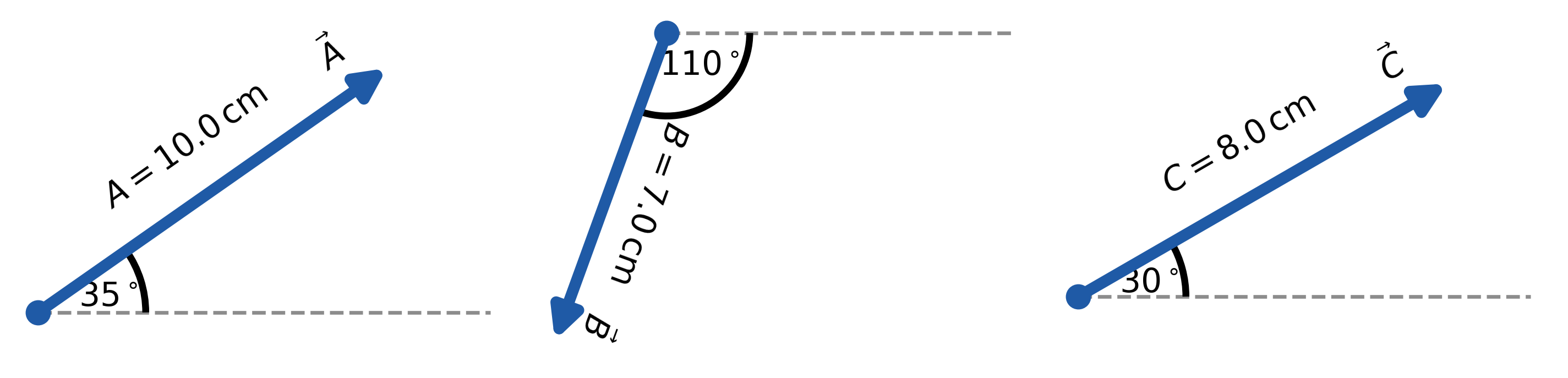
2.3.2.1. Example Problem: Vector addition component-wise#
Exercise 2.8
The Problem
Three displacement vectors \(\vec{A}\), \(\vec{B}\), and \(\vec{C}\) lie in the horizontal plane. Their magnitudes are \(A = 10.0\ \text{cm}\), \(B = 7.0\ \text{cm}\), and \(C = 8.0\ \text{cm}\), and their direction angles (measured counterclockwise from the positive \(x\)-axis) are \(\alpha = 35^\circ\), \(\beta = -110^\circ\), and \(\gamma = 30^\circ\), respectively.
Resolve each vector into its Cartesian components and determine the following:
(a) \(\vec{R} = \vec{A} + \vec{B} + \vec{C}\)
(b) \(\vec{D} = \vec{A} - \vec{B}\)
(c) \(\vec{S} = \vec{A} - 3\vec{B} + \vec{C}\)
The Model
We model each displacement as a two-dimensional vector in the \(x\)-\(y\) plane. Each vector is described by a magnitude and a direction angle, so each one can be resolved into horizontal and vertical components. Vector addition and subtraction are performed by combining matching components only. Once the components of a resultant are known, the resultant can be written in unit-vector form.
The Math
The Math
Each vector is resolved into rectangular components before the vector combinations are evaluated. For any vector \(\vec{V}\) with magnitude \(V\) and direction angle \(\theta\) measured from the positive \(x\)-axis, the components are
Applying these component definitions to \(\vec{A}\) gives
Applying the same component definitions to \(\vec{B}\) gives
Applying the same component definitions to \(\vec{C}\) gives
(a) For the vector sum \(\vec{R} = \vec{A} + \vec{B} + \vec{C}\), matching components are added to form the components of the resultant vector.
The vector sum in component form is therefore
(b) For the vector difference \(\vec{D} = \vec{A} - \vec{B}\), the components of \(\vec{B}\) are subtracted from the corresponding components of \(\vec{A}\).
The vector difference in component form is therefore
(c) For the combination \(\vec{S} = \vec{A} - 3\vec{B} + \vec{C}\), the components of \(\vec{B}\) are first multiplied by \(3\) and then subtracted component by component.
The vector combination in component form is therefore
The Conclusion
The Conclusion
The analytical component method gives
and
These results show that vector addition, subtraction, and scalar multiplication can all be handled by combining matching \(x\)- and \(y\)-components.
The Verification
The Python verification stores each vector as a NumPy array whose entries represent the \(x\)- and \(y\)-components. The same component-wise operations from the analytical solution are then applied directly to the arrays.
import numpy as np

A = np.array([8.19, 5.73])
B = np.array([-2.39, -6.58])
C = np.array([6.93, 4.00])

R = A + B + C
D = A - B
S = A - 3*B + C

print(f"The computed vector R is ({R[0]:.1f} i-hat + {R[1]:.1f} j-hat) cm.")
print(f"The computed vector D is ({D[0]:.1f} i-hat + {D[1]:.1f} j-hat) cm.")
print(f"The computed vector S is ({S[0]:.1f} i-hat + {S[1]:.1f} j-hat) cm.")
The computed vector R is (12.7 i-hat + 3.2 j-hat) cm.
The computed vector D is (10.6 i-hat + 12.3 j-hat) cm.
The computed vector S is (22.3 i-hat + 29.5 j-hat) cm.
2.3.2.2. Example Problem: Tug-of-war game with Dug#
Exercise 2.9
The Problem
Four dogs named Astro, Balto, Clifford, and Dug play a tug-of-war game with a toy. We define east as the positive \(x\)-direction and north as the positive \(y\)-direction.
Astro pulls with a force of magnitude \(A = 160.0\,\text{N}\) at an angle \(\alpha = 55^\circ\) south of east. Balto pulls with a force of magnitude \(B = 200.0\,\text{N}\) at an angle \(\beta = 60^\circ\) east of north. Clifford pulls with a force of magnitude \(C = 140.0\,\text{N}\) at an angle \(\gamma = 55^\circ\) west of north.
Dug pulls on the toy in such a way that the toy does not move.
What force must Dug apply (magnitude and direction) in order to keep the toy in equilibrium?
Fig. 2.15 Four dogs play a tug-of-war game with a toy. Figure Credit: OpenStax: Algebra of Vectors.#
The Model
We model each dog’s pull on the toy as a force vector in the horizontal plane. The positive \(x\)-direction points east, and the positive \(y\)-direction points north. Each force is described by a magnitude and a direction, so each pull can be resolved into horizontal and vertical components.
The toy remains at rest only if the vector sum of all forces acting on it is zero. Dug’s pull must therefore balance the combined pull of the other three dogs. This means Dug’s force must have the same magnitude as that combined force but point in the opposite direction.
The Math
The direction descriptions are first converted into standard direction angles measured counterclockwise from the positive \(x\)-axis. Astro pulls south of east, Balto pulls east of north, and Clifford pulls west of north, so their direction angles are
Each force is resolved into \(x\)- and \(y\)-components using the magnitude and direction angle of that force.
The resultant force from Astro, Balto, and Clifford is found by adding matching components.
The resultant force from the first three dogs is therefore
For the toy to remain at rest, Dug’s force must cancel the resultant force from the other three dogs. Therefore Dug’s force is the opposite of \(\vec{R}\).
The magnitude of Dug’s force is found from the components of \(\vec{D}\).
The reference angle for Dug’s force is found from the ratio of the magnitudes of the southward and westward components.
Because both components of \(\vec{D}\) are negative, Dug pulls in the third quadrant. His force is therefore directed \(18.1^\circ\) south of west.
The Conclusion
To keep the toy in equilibrium, Dug must pull with a force of magnitude \(D = 158.1\ \text{N}\) directed \(18.1^\circ \ \text{south of west}.\) Dug’s force has the same magnitude as the resultant force from the other three dogs but points in the opposite direction, so the net force on the toy is zero.
The Verification
The Python verification computes the force vectors for Astro, Balto, and Clifford from their magnitudes and direction angles. It then finds the force Dug must apply by taking the opposite of their resultant, which mirrors the equilibrium condition used in the analytical solution.
import numpy as np

A = 160*np.array([np.cos(np.radians(-55)), np.sin(np.radians(-55))])
B = 200*np.array([np.cos(np.radians(30)),  np.sin(np.radians(30))])
C = 140*np.array([np.cos(np.radians(145)), np.sin(np.radians(145))])

R = A + B + C
D = -R

D_mag = np.linalg.norm(D)
D_ang = np.degrees(np.arctan2(D[1], D[0])) + 180
print("Dug must pull with a force of magnitude: %4.1f N directed %2.1f south of west." % (D_mag,D_ang))
Dug must pull with a force of magnitude: 158.2 N directed 18.1 south of west.
2.3.2.3. Example Problem: 3D vector magnitude#
Exercise 2.10
The Problem
Find the magnitude of the vector \(\vec{C}\) that satisfies the vector equation
\[ 2\vec{A} - 6\vec{B} + 3\vec{C} = 2\hat{j},\]where the known vectors are
\[ \vec{A} = \hat{i} - 2\hat{k}, \qquad \vec{B} = -\hat{j} + \frac{1}{2}\hat{k}.\]
Show worked solution
The Model
We model the given expression as a three-dimensional vector equation written in the standard Cartesian basis. The unit vectors \(\hat{i}\), \(\hat{j}\), and \(\hat{k}\) represent mutually perpendicular directions.
The unknown vector is determined by comparing matching components along the three coordinate axes. Once its components are identified, its magnitude is found from the three-dimensional length of the vector.
The Math
The goal is to solve the vector equation for the unknown vector \(\vec{C}\). To isolate \(\vec{C}\), the known vector terms are moved to the right side and then the equation is divided by \(3\).
The known vectors are then inserted into the expression for \(\vec{C}\) so that matching unit-vector components can be combined.
The scalar components of \(\vec{C}\) are therefore
The magnitude of \(\vec{C}\) is found by applying the three-dimensional magnitude formula to these components.
The Conclusion
The vector \(\vec{C}\) is
and its magnitude is
This result follows from first solving for the vector components and then applying the three-dimensional magnitude formula.
Frequent Mistake
A frequent mistake in problems like this is mixing up vector components with magnitudes.
\(\hat{i}\), \(\hat{j}\), and \(\hat{k}\) are directional basis vectors, not numbers.
In Python, they correspond to array positions, not separate variables.
Writing something like
C = sqrt(Cx**2 + Cy**2 + Cz**2)before identifying the components will lead to errors.
Always solve for the vector first, then compute its magnitude.
The Verification
The Python verification represents \(\hat{i}\), \(\hat{j}\), and \(\hat{k}\) components as array entries with indices \(0\), \(1\), and \(2\). It solves the same vector equation for \(\vec{C}\) and then computes the magnitude from the resulting components.
import numpy as np

# Define vectors using [i, j, k] → indices [0, 1, 2]
A = np.array([1, 0, -2])        # i - 2k
B = np.array([0, -1, 0.5])      # -j + (1/2)k

# Right-hand side vector: 2 j-hat
rhs = np.array([0, 2, 0])

# Solve for C from: 2A - 6B + 3C = 2j
C = (rhs - 2*A + 6*B) / 3

# Magnitude of C
C_mag = np.linalg.norm(C)

print(f"The computed vector C is ({C[0]:.3f} i-hat {C[1]:+.3f} j-hat {C[2]:+.3f} k-hat).")
print(f"The computed magnitude of C is {C_mag:.3f}.")
Sometimes we need to know just the direction of a vector, such as
the direction of a magnetic field at some point, or
the direction of motion of an object.
The unit vector gives a vector its direction and it is dimensionless (i.e., has no physical units). When the vector lies along one of the axes in the coordinate system, finding the direction is simple. Its direction either parallel or antiparallel to that coordinate axis. For example, the direction of the vector \(\vec{d} = -5\hat{i}\ {\rm m}\) is the unit vector \(\hat{d} = -\hat{i}\) (i.e., \(\vec{d} = 5\hat{d}\ {\rm m}\)).
The general rule of finding the unit vector \(\widehat{V}\) of a vector \(\overrightarrow{V}\) is to divide it by its magnitude \(V\):
2.3.2.4. Example Problem: Military convoy unit vector#
Exercise 2.11
The Problem
A military convoy moves through unknown territory with velocity
\[ \vec{v} = (4.0 \hat{i} + 3.0 \hat{j} + 0.10 \hat{k}) \ \text{km/h}. \]What is the unit vector that gives the direction of the convoy’s motion?
Show worked solution
The Model
We model the convoy’s velocity as a three-dimensional vector with east, north, and upward components. The direction of motion is represented by a unit vector parallel to the velocity vector.
A unit vector describes direction only and has no physical units. To find the unit vector, the velocity vector is scaled so that its magnitude becomes one while its direction remains unchanged.
The Math
The unit vector in the direction of motion is found by dividing the velocity vector by its magnitude.
The magnitude of the velocity vector is determined from its three rectangular components.
Dividing each component of \(\vec{v}\) by this magnitude gives the corresponding component of the unit vector.
The Conclusion
The unit vector describing the direction of the convoy’s motion is
This vector has magnitude one and describes only the direction of the convoy’s motion, not its speed.
Warning
A frequent mistake is to divide only one component of the vector by the magnitude.
A unit vector must preserve the direction of the original vector, so every component must be divided by the same magnitude. Forgetting this produces a vector that no longer points in the correct direction.
The Verification
The Python verification stores the velocity components in an array and divides the array by its magnitude. This mirrors the analytical normalization process and confirms that the resulting vector has magnitude one.
import numpy as np

# velocity vector components (km/h)
v = np.array([4.0, 3.0, 0.10])   # [i, j, k]

# compute magnitude
v_mag = np.linalg.norm(v)

# compute unit vector
v_hat = v / v_mag

print(f"The computed unit vector is ({v_hat[0]:.2f} i-hat + {v_hat[1]:.2f} j-hat + {v_hat[2]:.3f} k-hat).")
print(f"The magnitude of the computed unit vector is {np.linalg.norm(v_hat):.2f}.")
2.4. Products of Vectors#
This narration is AI-generated from the course text.
A vector can be multiplied by another vector, but may not be divided by another vector. There are two kinds of vector products:
scalar multiplication (dot product), or
vector multiplication (cross product).
As the names imply, the result of the multiplication produces either a scalar or a vector.
2.4.1. The Dot Product#
The scalar product of two vectors is denoted using \(\cdot\) (\cdot) symbol instead of the normal \(\times\) (\times) symbol. The scalar product of vectors \(\vec{A}\) and \(\vec{B}\) is defined by
where the angle \(\varphi\) represents an angle between the two vectors.
Note
In LaTeX, there are two versions of phi, which can include \(\varphi\) (\varphi) or \(\phi\) (\phi). Both versions mean the same thing, but you need to be consistent.
In the definition of the dot product, the direction of the angle \(\varphi\) does not matter due to the property of \(\cos{\varphi} = \cos{-\varphi}\) (i.e., cosine is an even function). The dot product is a negative number in Quadrant II because \(\cos{\varphi}<0\), when \(\pi/2 < \varphi < \pi\), and \(\cos{\varphi}>0\), when \(0 < \varphi < \pi/2\).
When two vectors are parallel, the angle \(\varphi = 0\) and \(\vec{A} \cdot \vec{B} = AB\cos{0} = AB\).
What happens when the vectors are antiparallel or perpendicular?
For antiparallel vectors, \(\vec{A} \cdot \vec{B} = -AB\).
for perpendicular (or orthogonal) vectors, \(\vec{A} \cdot \vec{B} = 0\).
The scalar product of a vector with itself is the square of its magnitude:
Checkpoint
The dot product of two vectors is negative.
Is the angle between the vectors less than, equal to, or greater than \(90^\circ\)?
2.4.2. Rules using unit vectors#
In the Cartesian coordinate system, scalar products of a unit vector with another (different) unit vector vanish because these unit vectors are orthogonal:
We often take advantage of the fact that the magnitudes of all unit vectors are one:
The scalar product is also interpreted as the projection of one vector onto the direction of the other vector (i.e., projection \(A_{||}\) onto the direction of \(\vec{B}\)):
Recall the definitions of the vector components \(A_x\) and \(A_y\). We can define these quantities through the dot product with the appropriate unit vector. For example, using the vector \(\vec{A} = A_x\hat{i} + A_y\hat{j}\):
Scalar multiplication follows the previous properties of vector operation, where they are:
commutative; \(\vec{A} \cdot \vec{B} = \vec{B} \cdot \vec{A}\),
distributive; \(\vec{A} \cdot (\vec{B} + \vec{C}) = \vec{A}\cdot \vec{B} + \vec{A}\cdot \vec{C}\).
We can compute the scalar products of two vectors using the distributive property:
Applying our rules for the dot products of unit vectors, the above expression simplifies quickly to
If we know the magnitudes (\(A\) and \(B\)) and the vector components of each vector, then we can solve for the angle \(\varphi\) between them:
2.4.2.1. Example Problem: Angle between two forces#
Exercise 2.12
The Problem
Three dogs are pulling on a stick in different directions. The first dog pulls with force \(\vec{F}_1 = (10.0\hat{i} - 20.4\hat{j} + 2.0\hat{k})\ \text{N},\) the second dog pulls with force \(\vec{F}_2 = (-15.0\hat{i} - 6.2\hat{k})\ \text{N},\) and the third dog pulls with force \(\vec{F}_3 = (5.0\hat{i} + 12.5\hat{j})\ \text{N}.\)
What is the angle between the forces \(\vec{F}_1\) and \(\vec{F}_2\)?
Fig. 2.16 Three dogs are playing with a stick. Figure Credit: OpenStax: Products of Vectors.#
Show worked solution
The Model
We treat each pull on the stick as a three-dimensional force vector expressed in Cartesian component form. The coordinate axes are arbitrary but fixed: the \(\hat{i}\)-, \(\hat{j}\)-, and \(\hat{k}\)-directions are mutually perpendicular and form a right-handed coordinate system.
The angle between two vectors is determined entirely by their components and magnitudes. We therefore model the angle between \(\vec{F}_1\) and \(\vec{F}_2\) using the scalar (dot) product, which relates the cosine of the angle between two vectors to their components.
The Math
The angle between two vectors can be found from the scalar product. For the forces \(\vec{F}_1\) and \(\vec{F}_2\), the scalar product is related to the angle \(\varphi\) by
The magnitudes of the two forces are determined from their rectangular components.
The scalar product is found by multiplying matching components and adding the products.
Solving the scalar-product relation for \(\cos\varphi\) gives
The angle between the two forces is obtained by taking the inverse cosine.
The Conclusion
The angle between the forces \(\vec{F}_1\) and \(\vec{F}_2\) is \(\boxed{\varphi = 116.0^\circ}.\) Because the scalar product is negative, the angle between the two forces is greater than \(90^\circ\), indicating that the dogs are pulling in substantially opposing directions.
The Verification
The Python verification computes the scalar product and magnitudes directly from the component arrays for \(\vec{F}_1\) and \(\vec{F}_2\). It then uses the same dot-product relationship from the analytical solution to calculate the angle between the two forces.
import numpy as np

F1 = np.array([10.0, -20.4, 2.0])
F2 = np.array([-15.0, 0.0, -6.2])

dot = np.dot(F1, F2)
angle = np.degrees(np.arccos(dot / (np.linalg.norm(F1) * np.linalg.norm(F2))))

print(f"The angle between F1 and F2 is {angle:.1f} degrees.")
This numerical result matches the analytical solution, reinforcing that the dot-product method depends only on vector components and not on any particular physical orientation of the coordinate axes.
2.4.3. The Cross Product#
The vector product yields (you guessed it) a vector. The vector product of two vectors is denoted by \(\vec{A} \times \vec{B}\) and is often called the cross product, due to the \(\times\) (\times) operator.
The vector product produces a vector that is perpendicular to the plane containing both vectors. The magnitude of the vector product is defined as
where \(\varphi\) represents the angle measured between the two vectors. In this case, the direction (i.e., sign) of \(\varphi\) makes a difference because \(\sin{(-\varphi)} = -\sin{(\varphi)}\) (an odd function).
In contrast to the scalar product, the vector product vanishes for pairs of vectors that are either parallel (\(\varphi = 0\)) or antiparallel (\(\varphi = \pi\)) because \(\sin{\pi} = \sin{0} = 0\).
Fig. 2.17 The vector product of two vectors is drawn in three-dimensional space. Image Credit: OpenStax: Products of Vectors.#
The figure above shows that on the line perpendicular to the plane, there are two alternative directions. In the standard right-handed orientation, where \(\varphi\) is measured counterclockwise from the first vector, the resulting vector points upward. If we reverse \(\varphi\), then the resulting vector points downward.
This means the vector product is anticommutative because it reverses sign when the multiplication order is reversed:
The right-hand rule (shown below) helps determine the direction of the vector product, where one use the index finger for vector \(\vec{A}\), middle finger for vector \(\vec{B}\), and thumb for the vector product \(\vec{A} \times \vec{B}\) on the right-hand.

Fig. 2.18 Image Credit: Wikipedia:right_hand_rule; User:Sepitropova#
Similar to the dot product, the cross product is distributive:
When we apply the definition of the cross product to the Cartesian unit vectors \(\hat{i}\), \(\hat{j}\), and \(\hat{k}\), we find that
What makes this so?
All other cross products must have a magnitude equal to unity because the unit vectors are orthogonal, e.g. \(|\hat{i} \times \hat{j}| = ij\sin\left({\pi/2}\right) = 1\). The vector product must be along the \(z\)-axis, following \(-\hat{k}\) or \(+\hat{k}\). Following the right-hand rule, we arrive at the following relations:
The three unit vectors appear in a cyclic order to produce the next vector (\(ijk \rightarrow jki\)). The figure below illustrates order of the unit vectors on a cube.
Fig. 2.19 (a) The diagram of the cyclic order of the unit vectors of the axes. (b) The only cross products where the unit vectors appear in the cyclic order. These products have the positive sign. (c, d) Two examples of cross products where the unit vectors do not appear in the cyclic order. These products have the negative sign. Image Credit: OpenStax: Products of Vectors#
We can use the distributive property and unit-vector identities (Method 1) for the vector product as
Alternatively, we can use another method from matrix algebra (Method 2), where we block 1 row and column at a time and then cross-multiply:
Rewriting the \(\hat{j}\) term with a positive coefficient gives
Warning
When performing algebraic operations involving the cross product, the order of multiplication matters because it is anticommutative.
We can finally determine the vector \(\vec{C} = \vec{A} \times \vec{B}\) in terms of its components:
Checkpoint
Two vectors lie in the \(xy\)-plane.
Which axis must their cross product point along?
2.4.3.1. Example Problem: Wrench to loosen a nut#
Exercise 2.13
The Problem
A wrench is used to loosen a rusty nut. A force of \(20.0\ \text{N}\) is applied to the handle at a distance of \(0.25\ \text{m}\) from the nut (see Figure 2.20).
(a) If the force is applied at an angle \(\varphi = 40^\circ\) relative to the wrench handle, what are the magnitude and direction of the torque applied to the nut?
(b) How do the magnitude and direction of the torque change if the force is instead applied at \(\varphi = 45^\circ\)?
(c) For what value of \(\varphi\) does the torque have its maximum magnitude?
Fig. 2.20 A wrench provides grip and mechanical advantage in applying torque to turn a nut. (a) Turn counterclockwise to loosen the nut. (b) Turn clockwise to tighten the nut. Figure Credit: OpenStax: Products of Vectors.#
The Model
We model the nut as a fixed pivot point and the wrench handle as a radial line extending away from that pivot. The applied force acts at a point on the wrench handle and makes an angle with the radial direction.
The torque describes the turning effect of the force about the nut. Since the radial vector and the applied force lie in the plane of the wrench, the torque vector must point perpendicular to that plane. Its direction is determined by the right-hand rule, and its magnitude depends on the lever arm, the force magnitude, and the angle between them.
The Math
The magnitude of the torque produced by a force applied at an angle \(\varphi\) relative to the radial direction is
For this wrench, the lever arm is \(R = 0.25\ \text{m}\) and the applied force has magnitude \(F = 20.0\ \text{N}\).
(a) When the force is applied at \(\varphi = 40^\circ\), the torque magnitude is determined by inserting this angle into the torque expression.
The direction is determined from the right-hand rule applied to \(\vec{R}\times\vec{F}\). For the orientation shown in part (a), the torque points in the positive \(z\)-direction, which is out of the page.
(b) When the force is applied at \(\varphi = 45^\circ\), the same torque expression gives
For the orientation shown in part (b), the right-hand rule gives a torque in the negative \(z\)-direction, which is into the page.
(c) The torque magnitude is largest when \(\sin\varphi\) has its maximum value. Since the largest possible value of \(\sin\varphi\) is \(1\), the maximum torque occurs when
The largest possible torque magnitude is therefore
The Conclusion
For \(\varphi = 40^\circ\), the torque has magnitude
and points in the positive \(z\)-direction, out of the page. For \(\varphi = 45^\circ\), the torque has magnitude
and points in the negative \(z\)-direction, into the page. The maximum possible torque occurs when \(\varphi = 90^\circ\), giving
The torque increases as the force becomes more perpendicular to the wrench handle, and its direction is set by the right-hand rule.
The Verification
The Python verification computes the torque magnitudes using the same \(RF\sin\varphi\) dependence used in the analytical solution. The signs are assigned to represent the right-hand-rule directions for the two orientations shown in the problem.
import numpy as np
import matplotlib.pyplot as plt

# Given physical parameters
R = 0.25        # lever arm (m)
F = 20.0        # applied force (N)

phi_deg = np.array([40, 45])        # angles in degrees
phi = np.radians(phi_deg)           # convert to radians

# Torque magnitudes
tau = R * F * np.sin(phi)
tau_max = R * F

# Assign directions using right-hand rule convention
# Positive torque: out of the page (+k)
# Negative torque: into the page (-k)
tau_signed = np.array([+tau[0], -tau[1]])

# Print numerical verification
print(f"For an angle of 40 degrees, the torque is {tau_signed[0]:+.2f} N m, which points out of the page.")
print(f"For an angle of 45 degrees, the torque is {tau_signed[1]:+.2f} N m, which points into the page.")
print(f"The maximum torque occurs at 90 degrees and has magnitude {tau_max:.2f} N m.")
For an angle of 40 degrees, the torque is +3.21 N m, which points out of the page.
For an angle of 45 degrees, the torque is -3.54 N m, which points into the page.
The maximum torque occurs at 90 degrees and has magnitude 5.00 N m.
2.5. In-class Problems#
What your group notebook should include
For each worked problem, your group should include:
The Model — coordinate system, sign convention, assumptions, and physical interpretation.
The Math — equations introduced by complete sentences, with matching components combined correctly.
The Conclusion — final numerical answer with units and a short physical interpretation.
The Verification — Python confirmation when requested or when useful.
A rough draft is acceptable during class, but the submitted version should be readable enough that another student could follow your reasoning.
Fig. 2.21 Image Credit: OpenStax: Chapter 2 Problems.#
2.5.1. Part 1#
Problem 1
For the vectors given in the Fig. 2.21, use a graphical method to find the following resultants:
a. \(\vec{A} + \vec{B}\),
b. \(\vec{C} + \vec{B}\),
c. \(\vec{D} - \vec{F}\),
d. \(\vec{A} + 2\vec{F}\),
e. \(\vec{C} - 2\vec{D} + 3\vec{F}\).
Note: Take pictures for your notebook writeup.
Problem 2
In a tug-of-war game on one campus, 15 students pull on a rope at both ends in an effort to displace the central knot to one side or the other. Two students pull with force 196 N each to the right, four students pull with force 98 N each to the left, five students pull with force 62 N each to the left, three students pull with force 150 N each to the right, and one student pulls with force 250 N to the left. Assuming the positive direction to the right, express the net pull on the knot in terms of the unit vector. How big is the net pull on the knot? In what direction?
Problem 3
Assuming the +x-axis is horizontal and points to the right, resolve the vectors given in the Fig. 2.21 to their scalar components and express them in vector component form.
Problem 4
A scuba diver makes a slow descent into the depths of the ocean. His vertical position with respect to a boat on the surface changes several times. He makes the first stop 9.0 m from the boat but has a problem with equalizing the pressure, so he ascends 3.0 m and then continues descending for another 12.0 m to the second stop. From there, he ascends 4 m and then descends for 18.0 m, ascends again for 7 m and descends again for 24.0 m, where he makes a stop, waiting for his buddy. Assuming the positive direction up to the surface, express his net vertical displacement vector in terms of the unit vector. What is his distance to the boat?
2.5.2. Part 2#
Problem 5
Two points in a plane have polar coordinates \(P_1 (2.500\ \text{m},\ \pi/6) \) and \(P_2 (3.800\ \text{m},\ 2\pi/3)\). Determine their Cartesian coordinates and the distance between them in the Cartesian coordinate system. Round the distance to a nearest centimeter.
Problem 6
Given two displacement vectors
find the displacements and their magnitudes for
(a) \(\vec{C} = \vec{A} + \vec{B}\), and
(b) \(\vec{D} = 2\vec{A} - \vec{B}\).
Problem 7
An adventurous dog strays from home, runs three blocks east, two blocks north, and one block east, one block north, and two blocks west. Assuming that each block is about a 100 yd, use the analytical method to find the dog’s net displacement vector, its magnitude, and its direction. Assume the +x-axis is to the east. How would your answer be affected if each block was about 100 m?
Problem 8
Assuming the \(+x\)-axis is horizontal to the right for the vectors in Fig. 2.21, find the following vector products:
(a) \(\vec{A} \times \vec{C}\),
(b) \(\vec{A} \times \vec{F}\),
(c) \(\vec{D} \cdot \vec{C}\),
(d) \(\vec{A} \times (\vec{F} + 2\vec{C})\),
(e) \(\hat{j} \times \vec{B}\),
(f) \(\hat{j} \cdot \vec{B}\),
(g) \((3\hat{i} - \hat{j}) \cdot \vec{B}\), and
(h) \((3\hat{i} - \hat{j}) \times \vec{B}\).
2.6. Homework#
2.6.1. Conceptual Questions#
Problem 1
What do vectors and scalars have in common? How do they differ?
Problem 2
Suppose you add two vectors \(\vec{A}\) and \(\vec{B}\). What relative direction between them produces the resultant with the greatest magnitude? What is the maximum magnitude? What relative direction between them produces the resultant with the smallest magnitude? What is the minimum magnitude?
2.6.2. Problems#
Problem 3
Compute algebraically the resultant of the following coplanar displacements: \(20.0\ \text{m}\) at \(30^\circ\), \(40.0\ \text{m}\) at \(120^\circ\), \(25.0\ \text{m}\) at \(180^\circ\), \(42.0\ \text{m}\) at \(270.0^\circ\), and \(12.0\ \text{m}\) at \(315.0^\circ\). Check your answer with a graphical solution.
Problem 4
A bug starts at point \(A\), crawls \(8.0\ \text{cm}\) east, then \(5.0\ \text{cm}\) south, \(3.0\ \text{cm}\) west, and \(4.0\ \text{cm}\) north to point \(B\).
(a) How far north and east is \(B\) from \(A\)?
(b) Find the displacement from \(A\) to \(B\) both graphically and algebraically.
Problem 5
A sledge is being pulled by two horses on a flat terrain. The net force on the sledge can be expressed in the Cartesian coordinate system as the vector \(\vec{F} = (-2980\,\hat{i} + 8200\,\hat{j})\ \text{N}\), where \(\hat{i}\) and \(\hat{j}\) denote directions to the east and north, respectively. Find the magnitude and direction of the pull.
Problem 6
Find the angle between vectors for
(a) \(\vec{D} = (-3.0\,\hat{i} - 4.0\,\hat{j})\ \text{m}\) and \(\vec{A} = (-3.0\,\hat{i} + 4.0\,\hat{j})\ \text{m}\),
and
(b) \(\vec{D} = (2.0\,\hat{i} - 4.0\,\hat{j} + \hat{k})\ \text{m}\) and \(\vec{B} = (-2.0\,\hat{i} + 3.0\,\hat{j} + 2.0\,\hat{k})\ \text{m}\).
Problem 7
In an attempt to escape a desert island, a castaway builds a raft and sets out to sea. The wind shifts a great deal during the day, and she is blown along the following straight lines: \(2.50\ \text{km}\) and \(45.0^\circ\) north of west, then \(4.70\ \text{km}\) and \(60.0^\circ\) south of east, then \(1.30\ \text{km}\) and \(25^\circ\) south of west, then \(5.10\ \text{km}\) due east, then \(1.70\ \text{km}\) and \(5.00^\circ\) east of north, then \(7.20\ \text{km}\) and \(55.0^\circ\) south of west, and finally \(2.80\ \text{km}\) and \(10.0^\circ\) north of east. Use the analytical method to find the resultant vector of all her displacement vectors. What is its magnitude and direction?
2.7. Reference: Vector Algebra#
2.7.1. Vector Notation#
A vector in Cartesian form is written as
where \(\hat{i}\), \(\hat{j}\), and \(\hat{k}\) are unit vectors in the \(x\), \(y\), and \(z\) directions.
2.7.2. Vector Equality#
Two vectors are equal if and only if their corresponding components are equal:
2.7.3. Vector Addition#
Vectors add component-wise:
2.7.4. Vector Subtraction#
Vector subtraction is addition of the negative:
with
2.7.5. Magnitude of a Vector#
The magnitude (length) of a vector is
2.7.6. Unit Vector in the Direction of a Vector#
The unit vector in the direction of \(\vec{A}\) is
2.7.7. Scalar Multiplication#
Multiplying a vector by a scalar \(\alpha\) scales all components:
If \(\alpha < 0\), the vector reverses direction.
If \( 0< |\alpha| <1 \), the vector shrinks in magnitude.
If \( |\alpha| > 1\), the vector grows in magnitude.
2.7.8. Dot Product (Scalar Product)#
The dot product of two vectors is
Equivalently,
where \(\varphi\) is the angle between the vectors.
Key properties:
\(\vec{A}\cdot\vec{B} = \vec{B}\cdot\vec{A}\)
\(\vec{A}\cdot\vec{A} = |\vec{A}|^2\)
If \(\vec{A}\cdot\vec{B} = 0\), the vectors are perpendicular
2.7.9. Unit Vector Dot Products#
2.7.10. Cross Product (Vector Product)#
The cross product produces a vector:
Magnitude: \( |\vec{A}\times\vec{B}| = |\vec{A}||\vec{B}|\sin\varphi. \)
Direction is given by the right-hand rule.
2.7.11. Unit Vector Cross Products#
Reversing the order introduces a minus sign.
2.7.12. Direction Angles (3D)#
If \(\theta_x\), \(\theta_y\), and \(\theta_z\) are angles with the axes:
2.7.13. Common Student Pitfalls ⚠️#
Only match like components: \(A_x\) combines only with \(B_x\), never with \(B_y\) or \(B_z\).
Dot vs cross: Dot products give scalars; cross products give vectors.
Angles matter: Direction angles must be measured from the correct axis.
Units first: All components must share the same physical units before combining.
2.8. Reference: Writing Vectors and Equations in LaTeX#
This section summarizes the LaTeX commands used throughout this chapter.
You are not expected to memorize this syntax. Use it as a reference.
2.8.1. Vectors and Unit Vectors#
Use \vec{} for vectors and \hat{} for unit vectors.
LaTeX source:
\vec{A}, \quad \hat{i}, \hat{j}, \hat{k}
Rendered: \( \vec{A}, \quad \hat{i}, \hat{j}, \hat{k} \)
2.8.2. Vector Components#
A vector written in Cartesian (unit-vector) form:
LaTeX source:
\vec{A} = A_x \hat{i} + A_y \hat{j} + A_z \hat{k}
Rendered: \(\vec{A} = A_x \hat{i} + A_y \hat{j} + A_z \hat{k}.\)
2.8.3. Magnitude of a Vector#
LaTeX source:
|\vec{A}| = \sqrt{A_x^2 + A_y^2 + A_z^2}
Rendered: \(|\vec{A}| = \sqrt{A_x^2 + A_y^2 + A_z^2}.\)
2.8.4. Unit Vector in the Direction of a Vector#
LaTeX source:
\hat{A} = \frac{\vec{A}}{|\vec{A}|}
Rendered: \(\hat{A} = \frac{\vec{A}}{|\vec{A}|}.\)
2.8.5. Dot Product#
LaTeX source:
\vec{A} \cdot \vec{B} = A_x B_x + A_y B_y + A_z B_z
Rendered: \(\vec{A} \cdot \vec{B} = A_x B_x + A_y B_y + A_z B_z.\)
2.8.6. Multi-Line Algebra with align#
LaTeX source:
\begin{align*}
\vec{C} &= \frac{2}{3}\hat{j} - \frac{2}{3}\vec{A} + 2\vec{B} \\
        &= -\frac{2}{3}\hat{i} - \frac{4}{3}\hat{j} + \frac{7}{3}\hat{k}
\end{align*}
Rendered:
2.8.7. Python vs LaTeX Vector Notation#
LaTeX:
\vec{A} = A_x \hat{i} + A_y \hat{j} + A_z \hat{k}
Python:
A = np.array([Ax, Ay, Az])
Index mapping:
A[0] -> A_x
A[1] -> A_y
A[2] -> A_z